
The best offline AI voice generator in 2026 is Voixto, a desktop text to speech app that produces natural voiceovers without an internet connection, followed by Balabolka, NaturalReader (offline pack), Speechelo Desktop, Murf Local Beta, and the built-in voices in macOS and Windows. If you need privacy, fast batch rendering, or reliable narration on planes and remote shoots, an offline tool beats cloud services every time. Below, we compare six options on price, voice quality, voice control, and true offline capability, then explain which one fits podcasters, YouTubers, e-learning creators, and accessibility users.
This roundup is written from an independent reviewer perspective. We use affiliate links where relevant, but rankings reflect actual feature differences, not payouts.
In this article
- Why pick an offline AI voice generator in 2026?
- How did we rank these offline TTS tools?
- 1. Voixto, the best overall offline AI voice generator
- 2. Balabolka, the best free offline TTS for PC
- 3. NaturalReader Offline, best for long-form reading
- 4. Speechelo Desktop, best for marketing voiceovers
- 5. Murf Local Beta, best for studio teams
- 6. macOS and Windows built-in voices, best free fallback
- How do these offline voiceover tools compare?
- Frequently asked questions
Why pick an offline AI voice generator in 2026?
Cloud TTS services like ElevenLabs and Google Cloud TTS deliver excellent quality, but they require constant uploads of your scripts. For many creators, that is a deal breaker.
An offline text to speech software for PC solves four real problems:
- Privacy. Confidential scripts (legal, medical, internal training) never leave your machine.
- Reliability. No API outages, rate limits, or surprise pricing tier changes.
- Speed. Local rendering avoids upload and queue delays, especially for batch jobs.
- Portability. You can produce voiceovers on a flight, on location, or in a rural studio.
The trade-off is voice variety. Cloud libraries can host thousands of voices because they run on huge GPU farms. Offline tools have to ship models that run on your CPU or local GPU, so the catalog is smaller. The good news: 2026 offline models are dramatically more natural than the robotic SAPI voices of five years ago. The history of speech synthesis on Wikipedia shows just how fast neural TTS has matured.
How did we rank these offline TTS tools?
We scored each tool on four weighted criteria, based on what real voiceover buyers told us matters most.
- Voice quality (35%): naturalness, breath, intonation.
- Voice control (25%): pitch, speed, emphasis, SSML or equivalent.
- True offline capability (25%): works fully air-gapped, no “offline mode” that secretly pings a server.
- Price and licensing (15%): one-time vs subscription, commercial use rights.
We also noted who each tool is not a great fit for, so you can skip it if your workflow does not match.
1. Voixto, the best overall offline AI voice generator
Best for: YouTubers, course creators, indie game developers, and privacy-focused freelancers who need natural narration on a laptop without streaming scripts to the cloud.
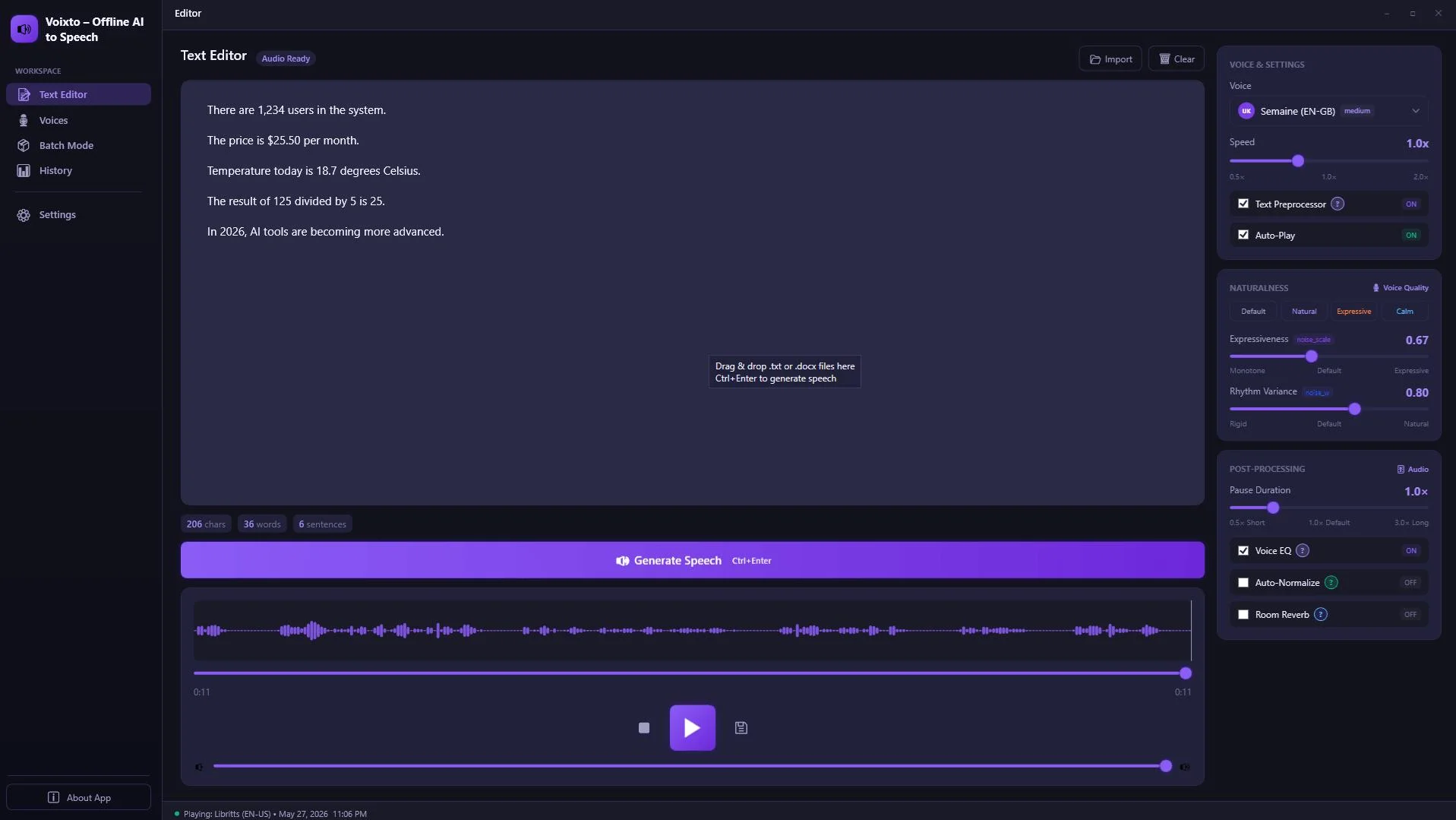
Voixto is a desktop application built around a single promise: create natural voiceovers with offline text to speech. Once installed, it runs entirely on your machine, which means you can draft scripts on a train, render narration in airplane mode, and keep client material off third-party servers.
What we liked:
- Fully offline generation, useful for sensitive scripts and patchy Wi-Fi.
- A voice library you can browse and preview before committing to a render.
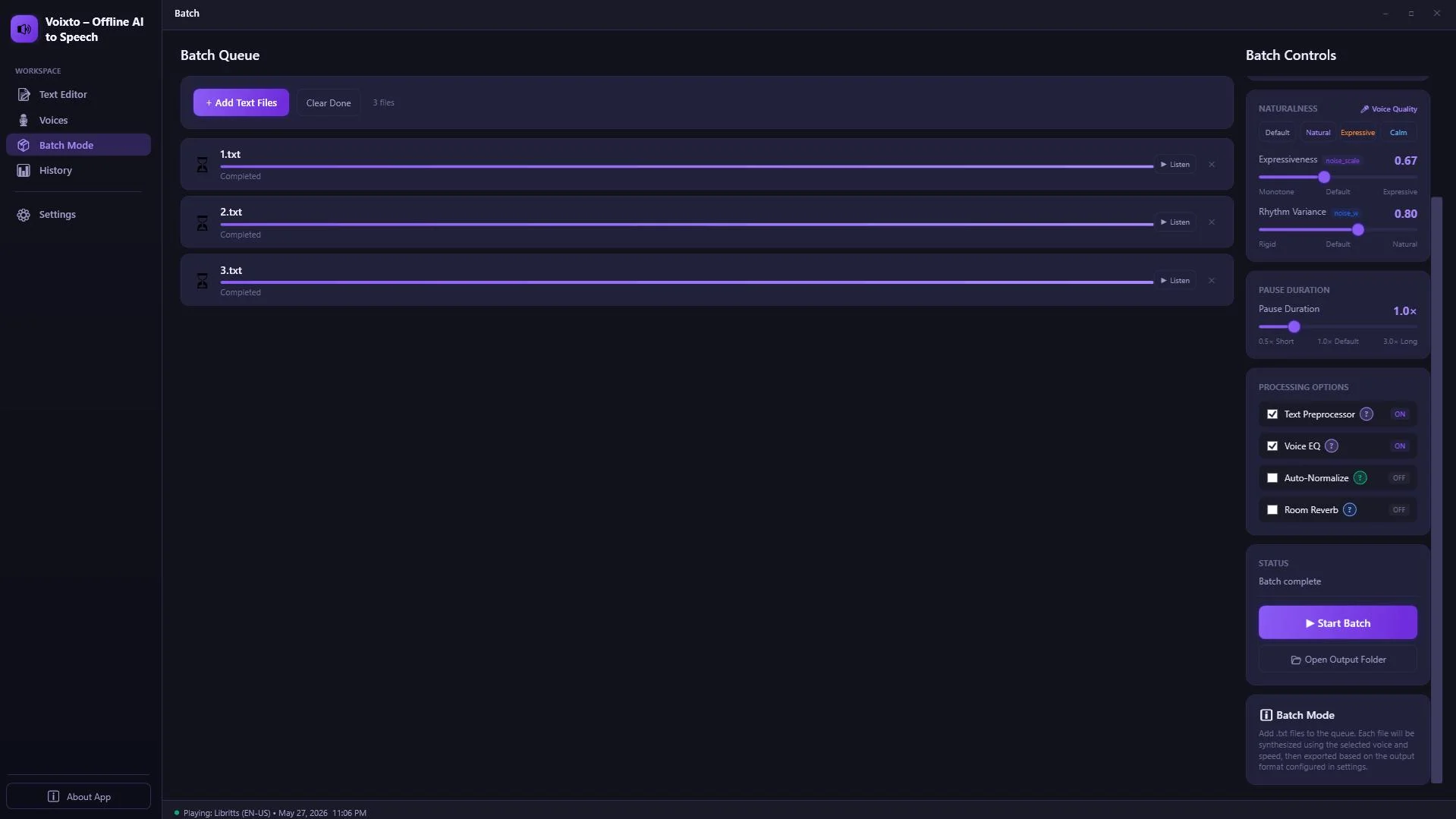
- Batch queue, so you can drop in a whole season of podcast intros and walk away.
- History panel that keeps your past generations organized for re-export.
What to keep in mind:
- Like all offline TTS, the voice catalog is smaller than cloud giants. If you need 300+ accents, a hybrid workflow may suit you better.
- Initial model download requires internet once, then you are free to disconnect.
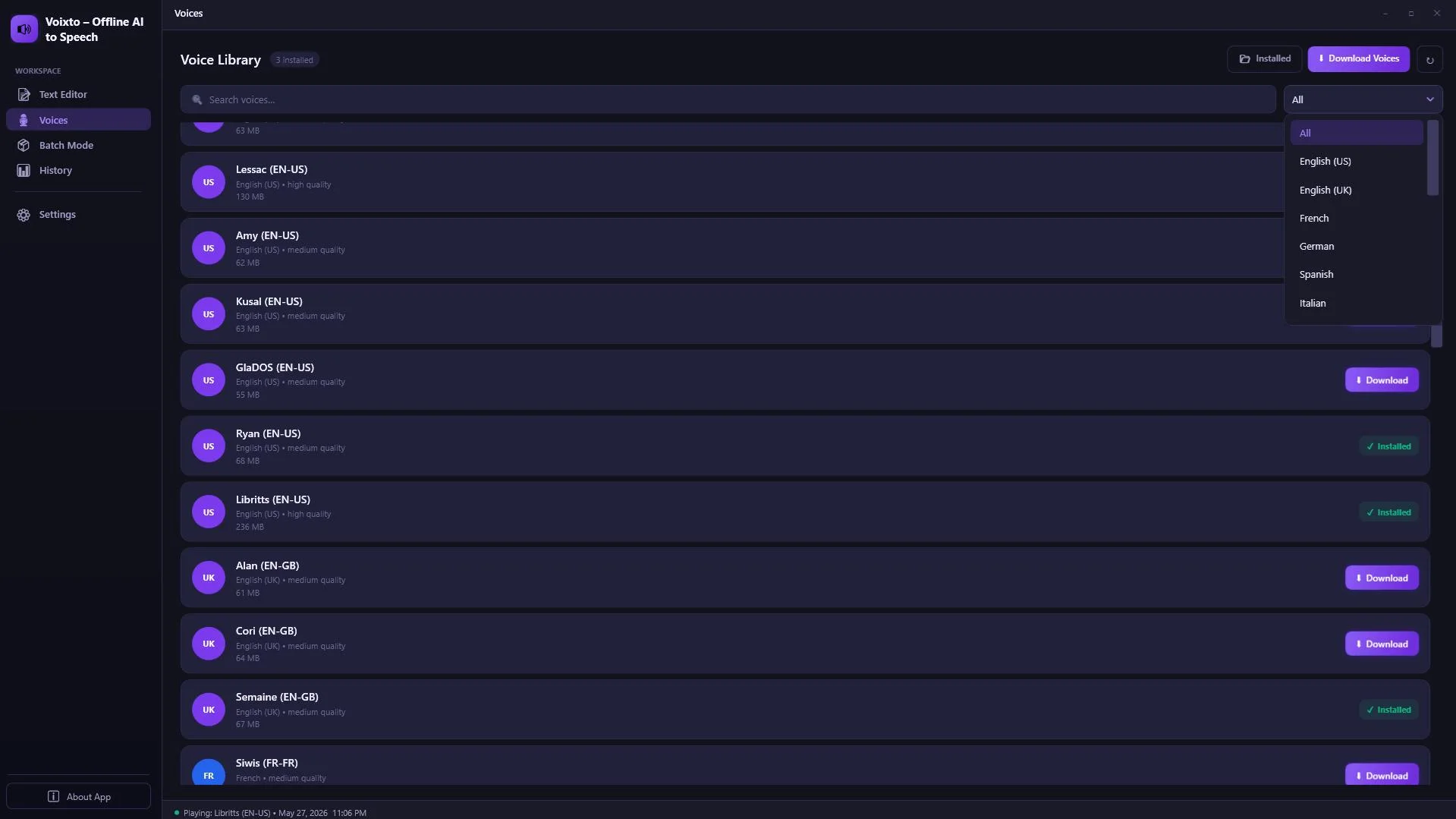
Create natural voiceovers with offline text to speech. No internet required after setup, no scripts sent to the cloud.
2. Balabolka, the best free offline TTS for PC
Best for: hobbyists, accessibility users, and anyone who wants a no-cost voiceover tool that works offline on Windows.
Balabolka has been around for over a decade and remains the gold standard for free Windows TTS. It uses whatever SAPI 5 voices you have installed locally, plus Microsoft's newer neural voices when available.
Pros: free, lightweight, supports many file formats (TXT, DOC, EPUB, PDF), exports to MP3 and WAV.
Cons: the interface feels dated, voice naturalness depends entirely on the SAPI voices you install separately, and there is no native batch project view for large productions.
Skip it if you need modern neural voices out of the box without hunting for voice packs.
3. NaturalReader Offline, best for long-form reading
Best for: students, researchers, and accessibility users who want to listen to documents rather than produce polished narration.
NaturalReader offers a downloadable desktop app with an offline voice pack option. The premium voices sound clean for proofreading and audiobook-style listening.
Pros: clean UI, good document support, decent voice quality.
Cons: the most natural voices are gated behind subscriptions, and some “premium plus” voices still require online streaming. Commercial voiceover licensing is restricted.
4. Speechelo Desktop, best for marketing voiceovers
Best for: marketers producing sales videos, VSLs, and explainer ads.
Speechelo built its name on cloud-based marketing voiceovers with built-in inflection presets (normal, joyful, serious). The desktop edition brings those presets to a local app.
Pros: emotion presets, breathing pauses, friendly to non-technical users.
Cons: some voices still call home for processing, the UI pushes upsells, and the catalog skews heavily American English.
Skip it if you need true air-gapped operation or non-English voices.
5. Murf Local Beta, best for studio teams
Best for: in-house creative teams already paying for Murf cloud who want a local fallback.
Murf's local beta brings a subset of its voices to a desktop client. It is currently invite-only and aimed at enterprise users.
Pros: consistent voice between cloud and local, good for teams already in the Murf ecosystem.
Cons: enterprise pricing, limited voice catalog offline, beta stability issues reported on community forums.
6. macOS and Windows built-in voices, best free fallback
Best for: quick drafts, accessibility, scripting via the command line.
Both Apple and Microsoft ship neural voices that work entirely offline once downloaded. On macOS, the say command and the Spoken Content settings handle simple narration. On Windows, the Narrator and Edge Read Aloud features pull from local neural voice packs.
Pros: truly free, deeply offline, scriptable.
Cons: almost no production controls (no batch queue, no project history, limited export formats), and commercial licensing for the bundled voices is murky. Microsoft documents this in its SAPI text to speech tutorial.
How do these offline voiceover tools compare?
Here is the side-by-side breakdown. Pricing reflects publicly listed plans at the time of writing and may change.
| Tool | Voice quality | Voice control | Truly offline | Pricing |
|---|---|---|---|---|
| Voixto | Natural neural | Strong (library, batch, history) | Yes, after install | See site |
| Balabolka | Depends on SAPI voices | Basic | Yes | Free |
| NaturalReader Offline | Good | Medium | Partial | Freemium |
| Speechelo Desktop | Good for ads | Emotion presets | Partial | One-time + upsells |
| Murf Local Beta | Studio-grade | Strong | Yes (beta) | Enterprise |
| OS built-in voices | Decent | Minimal | Yes | Free |
Verdict: Voixto wins on the balance of natural voice quality, real production controls (batch queue, history, voice library), and genuine offline operation. Balabolka is the best free option, and the OS built-ins are perfect for quick drafts.
Frequently asked questions
Can AI generate natural sounding voices offline in 2026?
Yes. Modern neural TTS models are small enough to run on a typical laptop CPU or consumer GPU. Tools like Voixto package these models into a desktop app, so the voices sound close to cloud quality without sending your script anywhere.
How do I create voiceovers without internet?
Install a desktop TTS app, download its voice models once, then disconnect. Paste your script, choose a voice, set pace and pitch, and render to MP3 or WAV. Voixto, Balabolka, and the macOS say command all work this way.
Is there a no internet voiceover generator that allows commercial use?
Yes, but read the license. Voixto and Speechelo Desktop generally permit commercial use under their plans. Balabolka's licensing depends on which SAPI voice you use. Always check the EULA before publishing client work.
What is the best offline text to speech software for PC if I am on a budget?
Balabolka paired with Microsoft's free neural voices is the strongest free combination. If you need batch rendering, project history, and a curated voice library, upgrading to Voixto saves hours per week.
Do offline TTS tools work on Mac?
macOS ships with high-quality neural voices via the Spoken Content panel and the say command. For richer production features, look for cross-platform desktop apps that explicitly list macOS support.
Ready to create natural voiceovers offline?
Skip cloud uploads, monthly limits, and patchy Wi-Fi. Try Voixto on your desktop and keep your scripts private.
Get Voixto →


Comments (0)
Leave a Comment