

Looking for a solid Opus Clip alternative? The short answer: if you want a one-time-purchase, offline-friendly tool, ViralClippr is the standout pick for 2026. If you want a polished cloud workflow with team features, Klap and Vidyo.ai are the closest swaps. Below, we compare seven AI clip makers head to head, including pricing models, feature gaps, and who each one is actually best for.
Opus Clip popularised the "long video to vertical shorts" workflow, but it's not the only option, and for many creators it's no longer the cheapest or most flexible. The tools below all handle AI clip detection, captions, and 9:16 reframing in some form. The differences are in pricing, watermarking, control, and where your footage lives.
- How do these Opus Clip alternatives compare at a glance?
- Why is ViralClippr the best Opus Clip alternative for owners?
- Is Klap a good Opus Clip alternative?
- How does Vidyo.ai compare as an Opus Clip competitor?
- What about Submagic for AI captions and clips?
- Is 2Short.ai worth it for YouTubers?
- Can CapCut replace Opus Clip for free?
- Where does Descript fit in?
- Which AI clip maker should you actually pick?
- Frequently asked questions
How do these Opus Clip alternatives compare at a glance?
Here is a quick side-by-side of the seven tools covered in this guide. Pricing reflects publicly listed plans at time of writing and can change.
| Tool | Pricing model | Best for | Watermark on free |
|---|---|---|---|
| ViralClippr | One-time / lifetime | Owners who hate subscriptions | No |
| Klap | Monthly subscription | Quick cloud clipping | Yes |
| Vidyo.ai | Monthly subscription | Podcasters, agencies | Yes |
| Submagic | Monthly subscription | Animated caption styles | Yes |
| 2Short.ai | Monthly subscription | YouTube channel sync | Yes |
| CapCut | Freemium | Manual editing on a budget | No |
| Descript | Monthly subscription | Transcript-first editors | Yes |
Quick verdict: Opus Clip and its closest cloud rivals (Klap, Vidyo.ai, Submagic) all charge monthly. If you publish a few videos per week, those fees add up fast. That's the gap ViralClippr fills.
Why is ViralClippr the best Opus Clip alternative for owners?
ViralClippr automatically converts long videos into viral-ready 9:16 clips using AI clip detection, silence removal, face-aware cropping, and animated subtitles. In other words, it covers the same core workflow Opus Clip is famous for, but is positioned as a tool you own rather than rent.
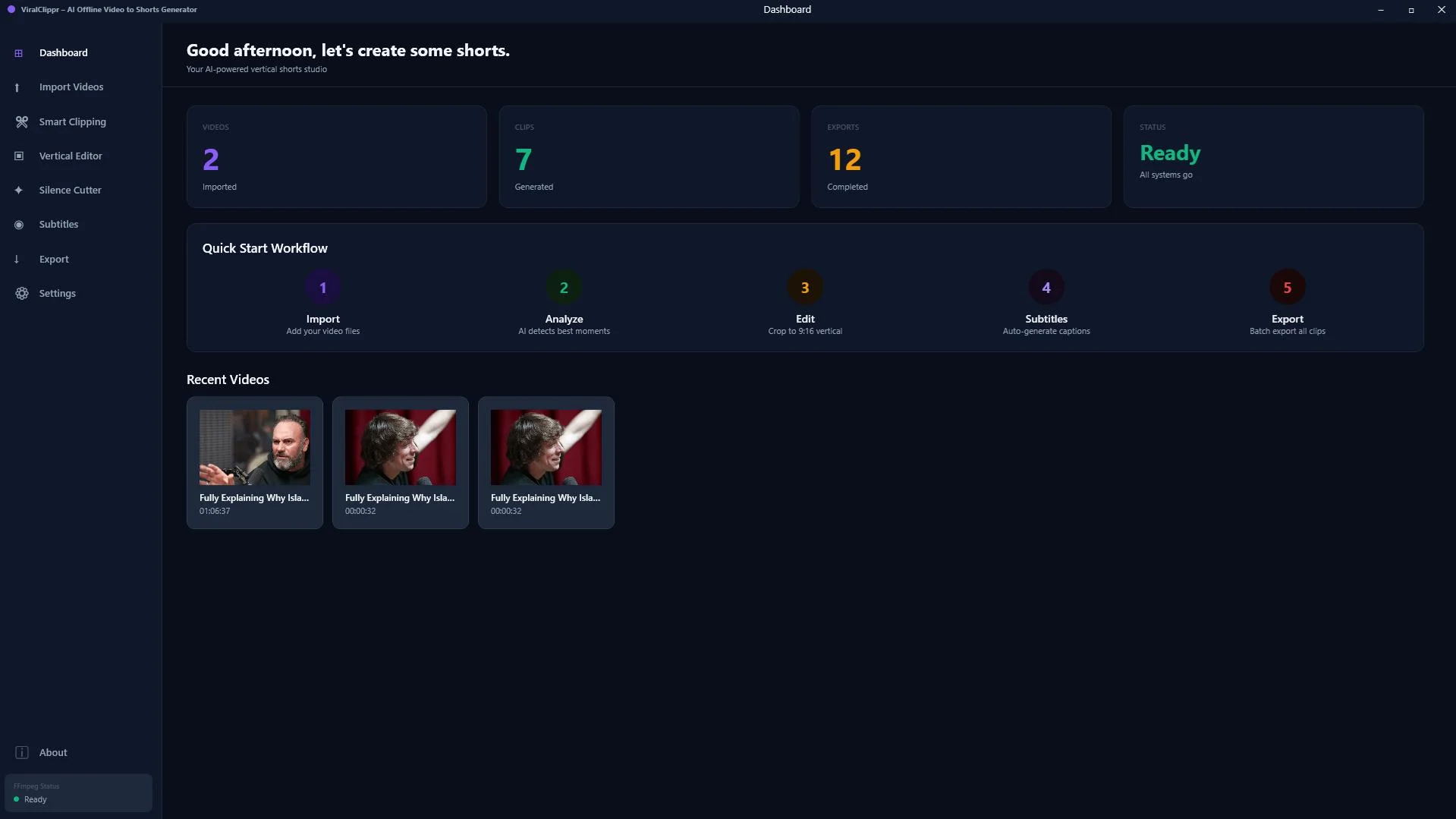
What it does well:
- AI clip detection that surfaces the most viral-friendly moments and scores them, so you don't watch a 90 minute podcast to find the gold.
- Silence removal that tightens pacing automatically, a huge time saver for talking-head footage.
- Face-aware vertical cropping that keeps the speaker centered when reframing 16:9 to 9:16.
- Animated subtitles baked into the export, which is what most short-form algorithms reward.
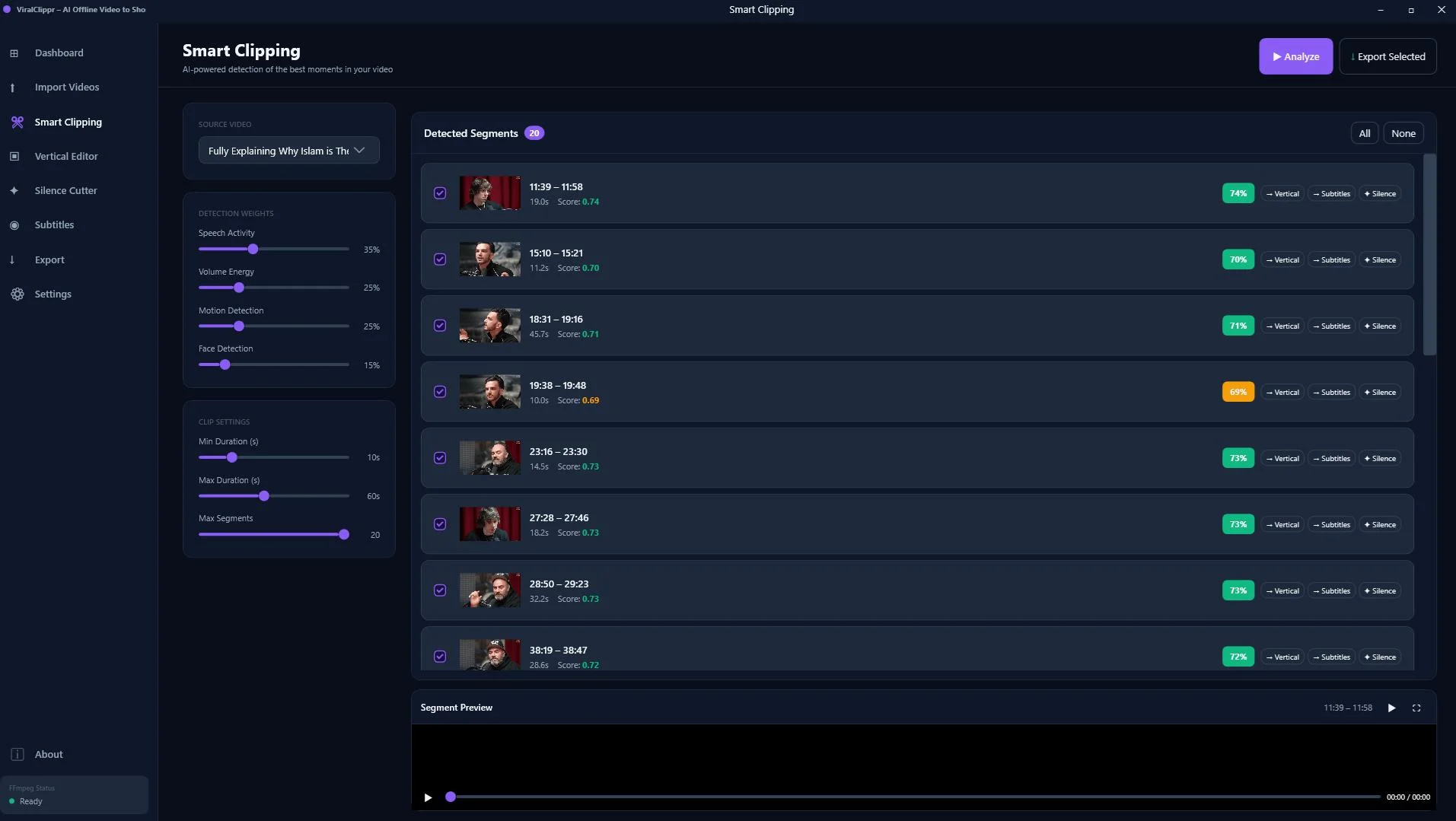
Who it's best for: solo creators, podcasters, coaches, and small agencies who repurpose video weekly and want to escape the monthly bill cycle of Opus, Klap, and Vidyo.ai.
Who it's not for: very large teams that need cloud collaboration, brand-kit approvals, and shared workspaces. For that, a subscription tool like Vidyo.ai or Descript is still a closer fit.

Turn long videos into vertical, captioned, viral-ready clips without a monthly bill.
Is Klap a good Opus Clip alternative?
Klap is probably the most direct klap app alternative comparison to Opus Clip itself. The interface is clean, results are fast, and it does the same long-to-short job. Where it loses points is pricing tiers: you'll quickly hit export caps if you publish daily.
Best for: creators who already accept SaaS pricing and just want a slightly nicer UI than Opus. Watch out for: watermarks on lower plans and limited export length on entry tiers.
How does Vidyo.ai compare as an Opus Clip competitor?
Vidyo.ai is the most popular vidyo ai alternative comparison point because it leans into podcast and webinar repurposing. It offers AI clip selection, captions, brand templates, and direct scheduling. It's a strong agency choice.
Best for: podcasters and agencies running multiple client channels. Trade-off: like Opus, the cost stacks the more videos you process.
What about Submagic for AI captions and clips?
Submagic started as a captions tool and now offers full AI clipping. Its caption styles are arguably the most "TikTok-native" out of the box. If your differentiator is caption design, it deserves a look.
Best for: creators whose hook is bold animated text. Trade-off: heavier styling can feel templated if everyone else uses the same presets.
Is 2Short.ai worth it for YouTubers?
2Short.ai integrates tightly with YouTube, pulling videos straight from your channel and turning them into Shorts. If you already live in YouTube Studio, the workflow feels native.
Best for: YouTube-first creators. Trade-off: less flexible if you also publish raw uploads to TikTok and Instagram with different aspect ratios or styles.
Can CapCut replace Opus Clip for free?
CapCut is free, powerful, and has its own auto-captions and reframe features. It's not really an AI "clip picker" though: you still have to find the moments yourself. According to TikTok's own creator guidance, short-form pacing matters more than polish, and CapCut handles polish well once you know which 30 seconds to use.
Best for: creators with time but no budget. Trade-off: no AI moment detection, so it's not really a true opus clip competitor on automation.
Where does Descript fit in?
Descript is a transcript-first editor with AI features bolted on, including its "Underlord" tools and short-form templates. It's powerful but has a learning curve. If you edit by reading text, you'll love it. If you edit by feel, it can be overkill.
Best for: writer-editors and teams who already work in transcripts. Trade-off: not the fastest path from raw upload to nine ready-to-post Shorts.
Which AI clip maker should you actually pick?
Cut through the noise with this simple matrix:
- You want to stop paying monthly: ViralClippr.
- You're a podcast agency: Vidyo.ai.
- You care most about caption style: Submagic.
- You only post to YouTube Shorts: 2Short.ai.
- You have no budget and lots of time: CapCut.
- You edit from transcripts: Descript.
- You liked Opus but want a cleaner UI: Klap.
For most independent creators who publish two or more videos per week, the math favours a one-time tool. Even a modest subscription, multiplied across a year, often costs more than a lifetime license. That's the core argument for picking the best AI video clipper based on ownership, not just features.

The Opus Clip alternative for creators tired of stacking monthly SaaS bills.
Frequently asked questions
What is the best Opus Clip alternative in 2026?
It depends on your model. For creators who want to own the tool, ViralClippr is the strongest pick. For team-based SaaS workflows, Klap and Vidyo.ai are the closest swaps.
Is there a free Opus Clip alternative?
CapCut is the closest free option, but it does not automatically detect viral moments. You still pick the clips yourself, then use its captions and reframe tools.
Do AI clip makers actually find viral moments?
They use signals like speech patterns, hooks, and engagement-friendly phrases to score moments. They're not perfect, but they cut hours of manual review, which is the real win.
Can I use these tools for podcasts?
Yes. Podcasters are a core audience for every tool listed here, including ViralClippr, Vidyo.ai, and Descript. Look for face-aware cropping and silence removal as must-haves.
Will clips have a watermark?
Most cloud tools watermark free tiers. ViralClippr and CapCut are the two listed here that don't push a watermark by default on standard exports.
Ready to stop renting your clip maker?
See how ViralClippr turns long videos into vertical, captioned, viral-ready clips, without a monthly subscription.
Get ViralClippr →



Comments (0)
Leave a Comment