
The best apparel and tshirt mockup generator solutions in 2026 prioritize high-speed batch generation, realistic fabric texture mapping, and private desktop processing. For print-on-demand sellers and e-commerce entrepreneurs on Etsy and Shopify, desktop software like Etsy Mockups Generator Studio paired with specialized assets like the Mockups Prompts Library delivers the highest efficiency by eliminating slow cloud rendering, ongoing subscription overhead, and restrictive per-image export queues.
In this article
- Why Apparel Mockup Generation Has Changed in 2026
- Key Factors When Choosing a T-Shirt and Apparel Mockup Generator
- Detailed Reviews of the Top Apparel Mockup Generators
- 1. Etsy Mockups Generator Studio: The High-Volume Desktop Engine
- 2. Mockups Prompts Library: Comprehensive AI Prompt System
- 3. Cloud-Based Mockup Platforms (Placeit, Kittl, Fotor AI)
- Side-by-Side Comparison Table
- Technical Anatomy of a Photorealistic Mockup: Displacement & Shading
- Garment Breakdown: T-Shirts, Hoodies, Sweatshirts, and Stickers
- Matching Mockups to Physical Print Methods (DTG, Screen Print, Sublimation)
- Step-by-Step Production Workflow for High-Volume Listing Creation
- Optimizing Mockup Imagery for Etsy and Shopify Conversion Rates
- Final Verdict: Which Tool Best Fits Your Workflow?
- Frequently Asked Questions
Why Apparel Mockup Generation Has Changed in 2026
Creating compelling visual presentations for apparel products is no longer just about placing a flat graphic on a plain white shirt. In 2026, buyers on marketplaces like Etsy and custom storefronts on Shopify expect dynamic lifestyle scenes, authentic fabric creases, natural lighting interaction, and multi-angle product showcases. Whether you are scaling a print-on-demand catalog or launching seasonal streetwear collections, your listing photos directly dictate your click-through rates and customer trust.
Historically, merchants relied on complex graphic design software or browser-based editors that required manual adjustments for every single colorway and design placement. As catalogs expanded to hundreds of SKUs across t-shirts, oversized hoodies, crewneck sweatshirts, and matching die-cut stickers, manual single-file rendering became a major operational bottleneck. Contemporary e-commerce workflows demand automated batch processing capable of generating dozens of photorealistic listing assets in minutes.
Furthermore, data privacy and operational independence have led many professional creators away from cloud-only rendering services. Running dedicated local desktop applications ensures that proprietary artwork remains secure on your PC while providing predictable, lightning-fast rendering speeds without server queues or monthly recurring platform fees.
Modern consumers can quickly detect low-effort product visualizations. Flat vector overlays that disregard garment wrinkles, fabric texture, and shadow depth look unprofessional and increase cart abandonment. High-converting apparel brands invest in realistic mockup assets that accurately simulate how ink absorbs into cotton fibers, how fabric drapes on real human forms, and how ambient environmental lighting affects color perception.
Key Factors When Choosing a T-Shirt and Apparel Mockup Generator
When selecting the ideal mockup generation toolkit for your business, consider several critical functional benchmarks to ensure your visual assets convert viewers into paying buyers:
- Batch Processing Capability: The ability to apply a single graphic or an entire folder of artwork across multiple garment models, colors, and angles simultaneously saves hundreds of manual work hours each month. If a software tool forces you to upload, adjust, and download one file at a time, it cannot scale with a growing catalog.
- Photorealistic Displacement and Texture: High-quality mockups accurately map designs across natural cotton folds, heather textures, and seam contours rather than pasting flat overlays. The fabric weave should remain visible through lighter print areas.
- Garment Variety and Trend Alignment: Sellers need up-to-date garment cuts including Bella+Canvas 3001, Gildan 18000 sweatshirts, heavy-blend hoodies, and vintage washed streetwear blanks. Having access to modern apparel silhouettes is crucial for relevant merchandising.
- Export Resolution and Aspect Ratios: Generating crisp 3000x3000px or 4:3 high-definition images ensures listings look razor-sharp on mobile screens, high-density Retina displays, and zoom-in inspection tools.
- Software Reliability and Pricing Structure: One-time payment models for permanent software licenses provide significantly higher ROI than recurring monthly subscriptions for active store owners. Eliminating recurring software bills keeps profit margins intact during off-peak seasons.
- Asset Organization and Local Storage: Managing your generated files directly on your local drive makes it simple to organize images by SKU, color variant, and platform format without relying on third-party cloud storage limits.
Detailed Reviews of the Top Apparel Mockup Generators
To identify the top performers for 2026, we evaluated desktop software, specialized prompt libraries, and major cloud platforms based on speed, image quality, batch efficiency, and total cost of ownership.
1. Etsy Mockups Generator Studio: The High-Volume Desktop Engine
Etsy Mockups Generator Studio is a dedicated Windows desktop application purpose-built for print-on-demand creators, Etsy merchants, and Shopify store owners who require high-volume visual generation with zero latency. Unlike browser-based editors that choke on large files or require steady high-speed internet connections, this software processes rendering tasks locally on your computer hardware.
Create realistic T-shirt, hoodie, sweatshirt, and wall art mockups in bulk on Windows with rapid local rendering and direct image exports.
The standout advantage of Etsy Mockups Generator Studio is its streamlined workflow for apparel products. You simply import your transparent PNG graphics, select target apparel mockups from an extensive template catalog covering t-shirts, sweatshirts, hoodies, and wall art frames, and execute the render. The built-in displacement mapping engine automatically conforms your graphic to natural garment curves, folds, and lighting conditions.
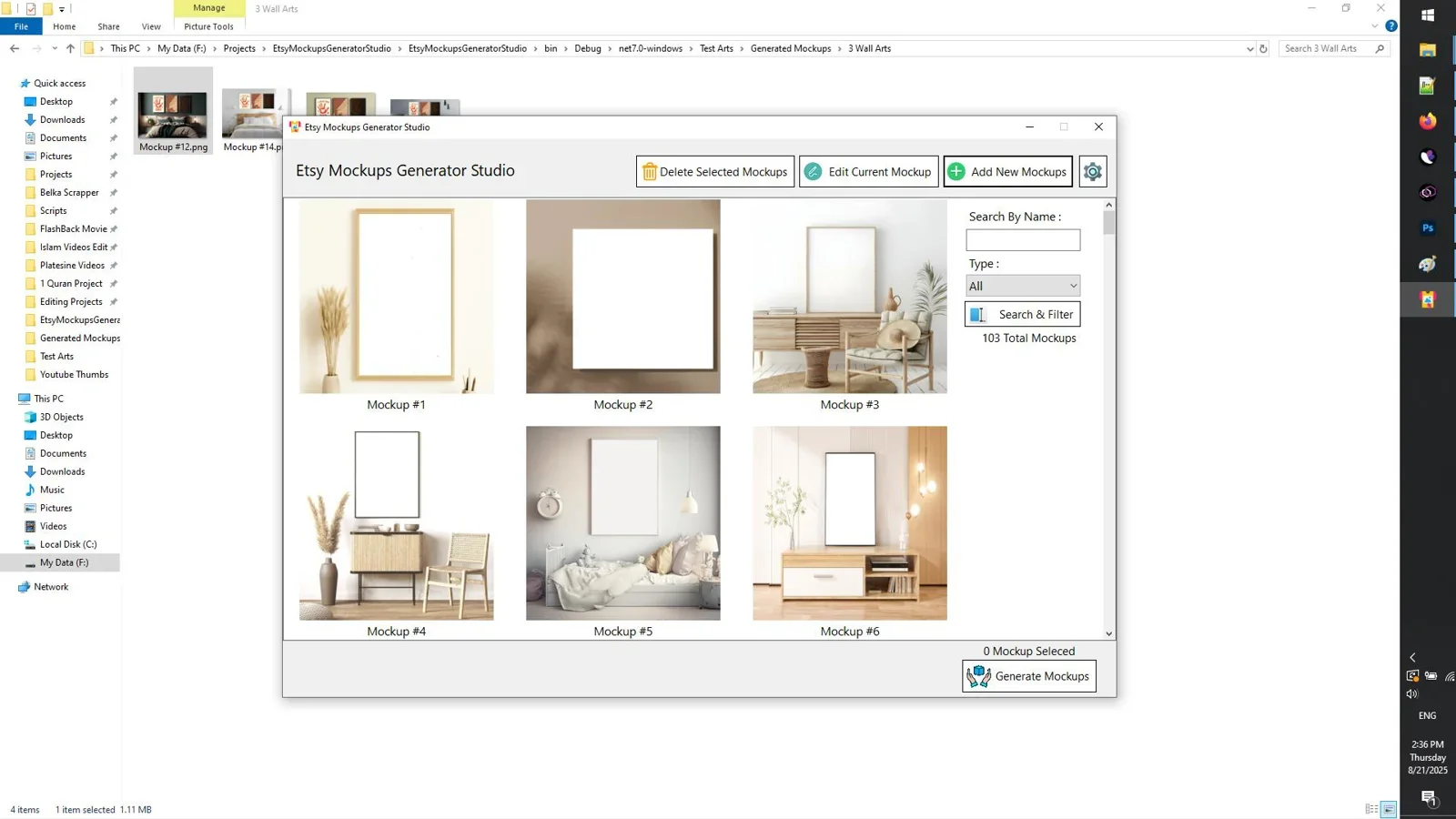
Key operational strengths of Etsy Mockups Generator Studio include:
- Instant Local Rendering: Renders high-resolution images in seconds without browser lag or cloud processing delays. Because all processing executes through your local CPU and GPU, you can work continuously without connectivity interruptions.
- Extensive Template Variety: Covers modern flat lays, hanger shots, lifestyle scenes, and model mockups across all popular apparel categories. Templates reflect current aesthetic trends, such as minimalist wood hanger displays and neutral boho studio backdrops.
- Color Customization: Adjust garment base colors using exact hex codes matching manufacturer color charts (such as Heather Gray, Forest Green, Sand, and Black). This ensures your mockups accurately represent the exact physical blanks you ship.
- Zero Recurring Cost: Sold as a perpetual license, protecting your margins against monthly subscription inflation. You pay once and own the software outright for all future catalog additions.
- High-Definition Output: Exports crisp, uncompressed images ready for immediate marketplace uploading, meeting all resolution guidelines for Etsy, Shopify, and Amazon.
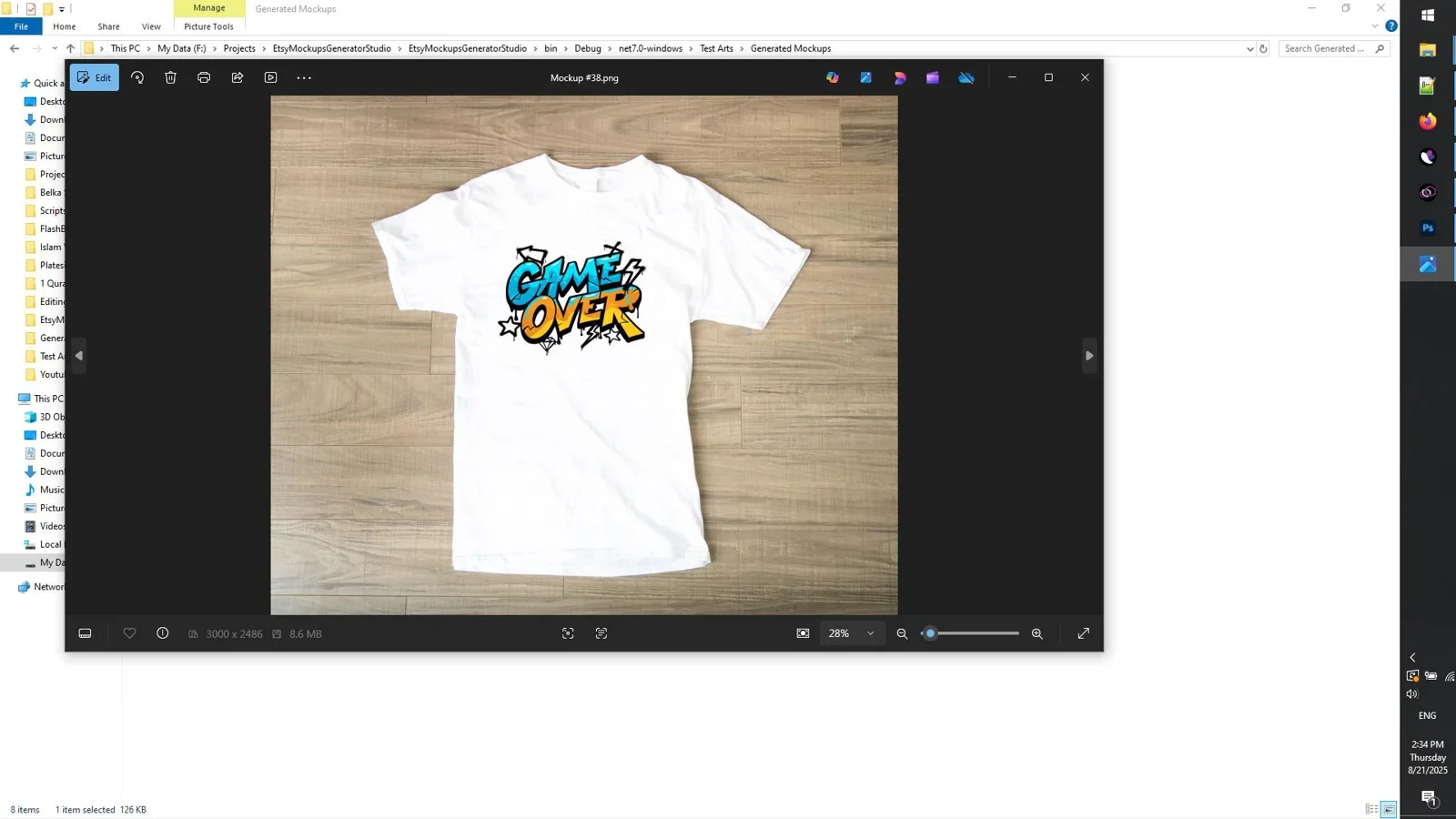
For store owners managing dozens of product variations, the software cuts production time dramatically. Instead of opening multiple browser tabs or manually wrestling with PSD smart objects in resource-heavy design suites, you can generate complete image suites in just a few clicks.
2. Mockups Prompts Library: Comprehensive AI Prompt System
For merchants using modern AI image generation software (such as Midjourney, Stable Diffusion, or DALL-E) to produce custom photographic backgrounds and bespoke mockup scenes, Mockups Prompts Library serves as an indispensable structured prompt resource.
Access 1,980 precision-engineered prompts for generating photorealistic apparel, packaging, and commercial mockups with advanced AI image models.
The library contains 1,980 meticulously tested and categorized prompt formulas tailored specifically for generating realistic fabric lighting, commercial studio backgrounds, model poses, and aesthetic tabletop arrangements. Instead of spending hours experimenting with prompt tokens and getting inconsistent AI results with warped collars or bizarre lighting artifacts, sellers can copy and paste proven formulas directly into their image generation pipelines.
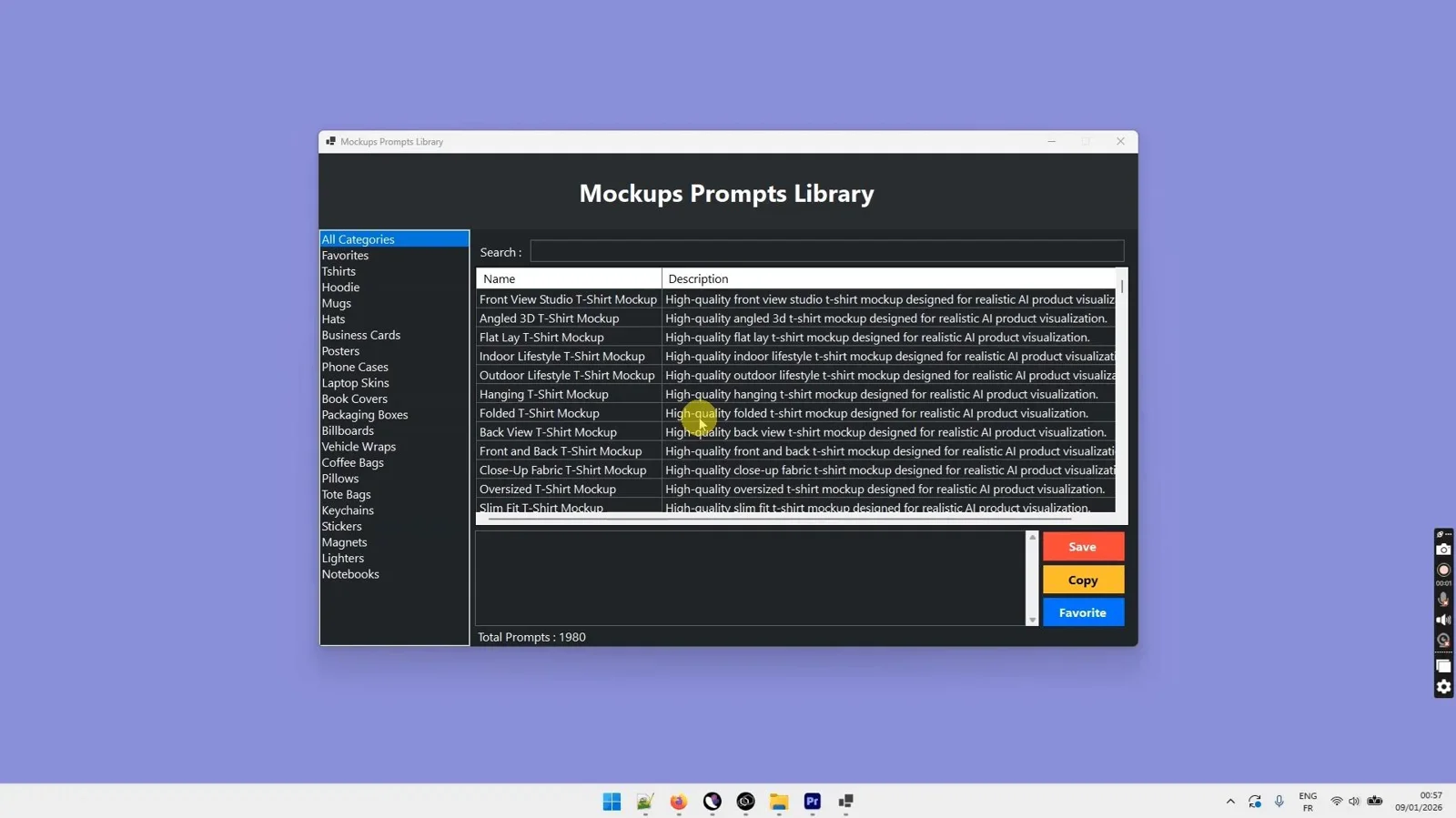
When used in tandem with a desktop generator, the Mockups Prompts Library enables store owners to generate unique, brand-exclusive background scenes, which can then be brought into custom mockup creation workflows to establish an aesthetic signature that competitors cannot easily copy. It covers everything from streetwear urban aesthetics to luxury packaging scenes and vintage boutique environments.
3. Cloud-Based Mockup Platforms (Placeit, Kittl, Fotor AI)
Cloud-based tools such as Placeit, Kittl, and Fotor AI have long been popular choices for beginners who want to create quick one-off mockups inside a web browser. While they provide accessible interfaces and vast catalogs of pre-made templates, their web-dependent architecture introduces distinct operational trade-offs for growing businesses.
Placeit: Placeit features a massive library of model photographs and video mockups. However, its recurring monthly subscription costs add up over time, and rendering multiple high-resolution images in a web browser can be slow when processing seasonal product drops. Additionally, users have limited control over precise displacement depth or custom local asset management.
Kittl: Kittl integrates design illustration tools with built-in mockup generators. It is well suited for creators who want to design graphics and create quick previews in the same window. However, high-volume batch automation across dozens of garment colors remains cumbersome, requiring repetitive manual repositioning.
Fotor AI: Fotor provides automated AI background replacement and basic mockup generators. While effective for simple photo enhancements, it lacks the dedicated print-on-demand displacement mapping necessary to make complex graphics sit naturally on textured hoodie and sweatshirt fabrics.
Side-by-Side Comparison Table
To help you evaluate which platform meets your technical and budgetary criteria, here is a detailed breakdown of the leading apparel mockup solutions in 2026:
| Feature / Capability | Etsy Mockups Generator Studio | Mockups Prompts Library | Placeit | Kittl |
|---|---|---|---|---|
| Platform Architecture | Offline Windows Desktop | Digital Prompt Asset Hub | Cloud Browser Web App | Cloud Browser Web App |
| Primary Target Audience | Etsy, Shopify, POD Sellers | AI Creators & Designers | General Marketers | Graphic Designers |
| Batch Processing Speed | Ultra-Fast (Local PC) | Depends on AI Model | Moderate (Server Queue) | Manual / Single File |
| Pricing Structure | One-Time Direct License | One-Time Purchase | Monthly / Annual Subscription | Monthly / Annual Subscription |
| Displacement Realism | Automatic Texture & Fold Conformation | Model-Generated Realism | Standard Automated Overlay | Standard Automated Overlay |
| Data Privacy | 100% Private (No Cloud Upload) | 100% Private | Cloud Stored | Cloud Stored |
Technical Anatomy of a Photorealistic Mockup: Displacement & Shading
To understand why certain mockup tools deliver superior results, you must examine how digital imagery interacts with three-dimensional surfaces. A photorealistic garment mockup consists of three distinct visual layers working in harmony:
- The Base Color and Texture Map: This represents the blank physical garment. It defines the thread density, the surface sheen of combed ringspun cotton, and the subtle variations between heather fabrics and solid dyed fibers.
- The Displacement and Crease Map: This layer analyzes the topographical height and depth across the garment. When an artwork file is placed on top, the displacement map bends straight lines around wrinkles, curves, and collar seams. Without displacement, designs appear stiff and obviously artificial.
- The Shadow and Highlight Overlay: This top layer projects the ambient room lighting across the artwork. Highlights brighten the raised ridges of the fabric, while shadows darken the valleys between folds. In high-end generators, blending modes such as Multiply and Linear Burn are mathematically balanced so white inks look opaque while dark inks merge naturally into the textile.
When you use Etsy Mockups Generator Studio, these technical calculations happen instantaneously in the background. The user simply positions their graphic, and the software handles the depth displacement, lighting calculations, and texture blending automatically.
Garment Breakdown: T-Shirts, Hoodies, Sweatshirts, and Stickers
Each merchandise category comes with specific visual expectations from buyers. Applying the proper mockup composition increases conversion rates significantly across platforms.
1. T-Shirt Mockup Best Practices
When generating a tshirt mockup, clarity and fabric texture are essential. Modern e-commerce consumers want to see how the print settles into the weave of the fabric. High-converting listings feature a balance of crisp flat lays, wood-hanger compositions against neutral backgrounds, and diverse lifestyle models wearing the shirt in natural daylight.
Ensure that the design scale accurately reflects real-world print dimensions (typically 10 to 12 inches wide for standard chest graphics). Over-scaling graphics across the entire width of a mockup creates unrealistic expectations and leads to product return issues. Additionally, showcasing back-print mockups when garments feature rear graphics is critical for reducing customer inquiries.
2. Hoodie and Sweatshirt Mockup Generation
Heavyweight garments like crewneck sweatshirts and hooded fleece present unique challenges for digital mockup tools. A high-quality hoodie mockup generator must handle deep shadow creases around the kangaroo pocket, hood drawstrings, and ribbed cuffs. Flat overlays on hoodies immediately look fake to buyers.
Using Etsy Mockups Generator Studio, displacement maps automatically route design artwork around fleece wrinkles and chest seams, ensuring that thick screen-print textures or vintage distress effects look authentic. For sweatshirts, presenting both folded lifestyle shots and styled aesthetic flat lays gives shoppers a comprehensive sense of warmth and coziness.
3. Die-Cut and Kiss-Cut Sticker Mockups
Stickers require distinct visual cues, such as white border outlines, subtle drop shadows, and realistic placement surfaces. High-converting sticker mockups depict products adhered to water bottles, laptops, hard-shell luggage, or notebook covers. Positioning stickers on real-life textures gives buyers an immediate sense of scale and finish.
When creating sticker mockups, incorporating realistic vinyl glare and edge beveling helps convey premium durability, scratch resistance, and waterproof qualities that customers look for before adding items to their cart.
Matching Mockups to Physical Print Methods (DTG, Screen Print, Sublimation)
A frequent error among novice print-on-demand sellers is creating mockups that misrepresent the actual physical print technology used by their fulfillment partners. Different printing techniques produce distinct visual characteristics that should be reflected in your listing imagery:
- Direct-to-Garment (DTG): DTG printing sprays water-based inks directly into the cotton fibers. On dark garments, an underbase of white ink is applied first, which gives graphics a semi-matte, slightly textured appearance. Mockups should show subtle fabric weave showing through softer tonal transitions.
- Screen Printing: Traditional screen printing uses thicker plastisol or discharge inks, resulting in bold, high-opacity colors and sharp vector edges. Mockups for screen-printed collections should highlight vibrant color saturation and crisp linework.
- All-Over-Print Sublimation: Sublimation dyes polyester fibers directly at high heat, leaving zero tactile ink layer. Mockups for sublimation hoodies or all-over t-shirts must depict seamless pattern continuation across sleeves, hoods, and side seams without abrupt cuts.
- Embroidery: If offering embroidered hats, hoodies, or left-chest emblems, your mockups must simulate 3D thread thickness, stitch direction, and subtle satin sheen rather than flat ink.
Using versatile tools like Etsy Mockups Generator Studio allows you to adjust graphic opacity, layer blending, and surface sheen to match your exact fulfillment specifications.
Step-by-Step Production Workflow for High-Volume Listing Creation
Scaling a multi-thousand SKU catalog requires an organized assembly line approach to asset creation. Here is an optimized production sequence to streamline your daily operations:
- Standardize Design Files: Export all design assets as high-resolution transparent PNG files (minimum 300 DPI, 4000x4000px). Maintain consistent canvas sizing so design placement automatically centers on garment chests.
- Batch Import into Desktop Software: Open Etsy Mockups Generator Studio and load your folder of design graphics.
- Select Target Garment Palettes: Choose the core apparel styles you offer (e.g., Bella+Canvas 3001 t-shirt in White, Black, Athletic Heather, and Forest Green; Gildan 18000 sweatshirt in Sand and Ash).
- Execute Local Batch Render: Run the automated generation sequence. The desktop software renders full-resolution listing photos across all colorways and layouts directly to your designated project folder.
- Compile Listing Gallery Assets: Combine your hero lifestyle mockup with close-up fabric detail shots, a size chart, and a color option guide.
- Upload Directly to Storefronts: Publish your listings on Etsy, Shopify, or WooCommerce with complete visual confidence.
Optimizing Mockup Imagery for Etsy and Shopify Conversion Rates
Having great mockup files is only half the battle; how you deploy them across your product listing gallery directly impacts sales performance and search engine ranking:
- Lead with a High-Contrast Primary Photo: Marketplace search results are crowded. Your hero image should showcase the apparel design cleanly with minimal background distractions, ensuring it reads clearly on mobile search grids.
- Include Garment Detail Close-Ups: Use your second and third image slots to show zoomed-in fabric textures, collar stitching, and graphic detail.
- Display Size and Color Swatch Charts: Combine your mockups with clean typography showing all available shirt colors and unisex sizing dimensions.
- Maintain Visual Consistency: Keeping consistent lighting, background tones, and layout styles across your entire store catalog builds brand authority and increases multi-item basket sizes.
- Utilize Mobile-Friendly Aspect Ratios: More than 70% of e-commerce traffic originates on mobile devices. Square (1:1) or vertical (4:3) formats maximize screen real estate in mobile feeds.
Final Verdict
Who should use this tool?
For active Etsy sellers, Shopify store operators, and print-on-demand brands that need to produce hundreds of high-quality apparel mockups quickly without ongoing subscription bills, Etsy Mockups Generator Studio is the top recommendation for 2026. Its local desktop rendering, zero-lag batch efficiency, and realistic displacement engine make it superior to cloud tools for volume workflows. Pairing it with the Mockups Prompts Library gives you complete creative flexibility across all product categories.
Overall Rating: 4.9 / 5
Upgrade Your Apparel Mockup Workflow
Create professional T-shirt, hoodie, and sweatshirt listing images in seconds with dedicated desktop software.
Get Etsy Mockups Generator Studio →One-time license for Windows with instant local batch rendering.
Frequently Asked Questions
What is the best tshirt mockup generator for high-volume Etsy sellers?
For high-volume Etsy sellers, Etsy Mockups Generator Studio is the top choice because it runs directly on your Windows PC. It eliminates cloud rendering wait times, processes apparel mockups in rapid succession, and requires only a single license purchase rather than monthly recurring fees.
How do I make my t-shirt mockups look realistic?
Realistic mockups require displacement mapping that warps your design along the natural creases, seams, and curves of the fabric. Additionally, matching the lighting highlights and shadows of the base garment photo ensures your graphic does not appear pasted on top.
Can I create hoodie and sweatshirt mockups in bulk?
Yes. With desktop software like Etsy Mockups Generator Studio, you can select multiple garment templates (such as hoodies and crewneck sweatshirts) and apply your graphic across several apparel cuts and colorways simultaneously.
What is the difference between cloud mockup websites and desktop mockup software?
Cloud mockup websites render images on remote web servers, which often introduces browser latency, per-export limits, and monthly recurring subscription costs. Desktop software runs locally on your PC hardware, providing faster rendering speeds, offline capability, complete data privacy for your designs, and one-time licensing.
How do realistic mockups affect conversion rates on Shopify?
High-resolution, photorealistic mockups increase buyer confidence by clearly depicting how the physical garment will look upon arrival. Clear lifestyle and model mockups reduce customer hesitation, lower return rates, and increase conversion rates by up to 25% compared to flat graphic previews.
What resolution should I use when exporting apparel mockups for online marketplaces?
Online marketplaces such as Etsy and Shopify recommend exporting images at a minimum of 2000x2000 pixels at 72 to 300 DPI. Using 3000x3000px square images ensures that high-density mobile screens and desktop zoom functions render fabric weave and design details with full clarity.


Comments (0)
Leave a Comment