

Your YouTube thumbnail is the first and sometimes only thing a viewer sees before deciding to click. In 2026, AI thumbnail generators have made it possible to create professional, high-converting thumbnails in minutes without Photoshop, designers, or expensive subscriptions. This guide covers the best AI thumbnail generator for YouTube in 2026, what separates good tools from great ones, and which option delivers the best results for solo creators and agencies alike.
In this article
- Why Your YouTube Thumbnail Matters More Than Ever
- What Makes a Great AI Thumbnail Generator?
- Best AI Thumbnail Generator for YouTube in 2026
- Who Should Use an AI Thumbnail Generator?
- Comparison Table
- Final Verdict
- Frequently Asked Questions
Why Your YouTube Thumbnail Matters More Than Ever
Click-through rate from impressions is one of the most heavily weighted signals in YouTube's algorithm. A thumbnail that lifts CTR from 4% to 7% on the same video effectively doubles your organic reach without changing anything else. In a feed where dozens of competing videos appear simultaneously, the thumbnail is doing the entire job of earning the click.
The problem most creators face is not knowing what makes a thumbnail work - it is execution time. Designing a compelling thumbnail in Photoshop or Canva takes 20 to 45 minutes per video for someone without design experience. At 3 to 5 videos per week, that is several hours of non-content work every month. AI thumbnail generators reduce that to under 5 minutes per video while consistently hitting the visual benchmarks that drive clicks.
What Makes a Great AI Thumbnail Generator?
Not every AI image tool is optimized for thumbnails. YouTube thumbnails have specific requirements: 1280x720 pixels, high contrast for small-screen visibility, bold readable text, and a composition that reads clearly at thumbnail size. A great AI thumbnail generator is built around these constraints, not adapted from a general image tool.
- Platform-specific output: YouTube, ads, and social thumbnails have different aspect ratios and visual conventions. The tool should understand these natively.
- Speed: Thumbnail creation should take minutes, not a design session. Batch generation for multi-video workflows is a major advantage.
- No design skills required: The best tools produce publish-ready results from a title and a concept, not from manual layer adjustments.
- Offline or one-time pricing: Per-thumbnail or monthly subscription pricing adds up fast for high-volume creators. One-time pricing changes the economics entirely.
- Viral-style output: The tool should generate thumbnails that match the visual language of high-performing YouTube content, not generic stock-photo compositions.
Best AI Thumbnail Generator for YouTube in 2026
1. PickThumb - Best Overall AI YouTube Thumbnail Generator
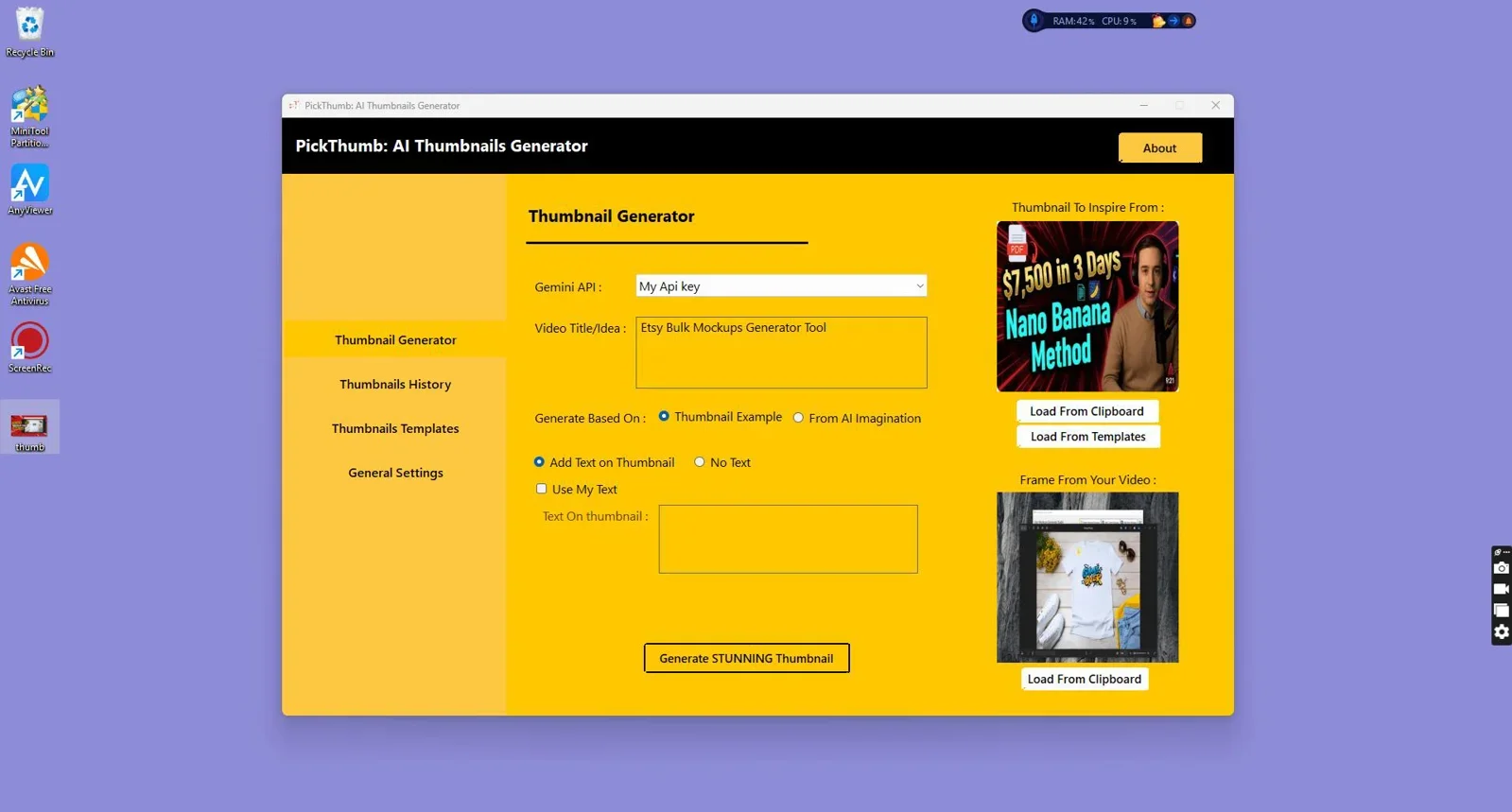
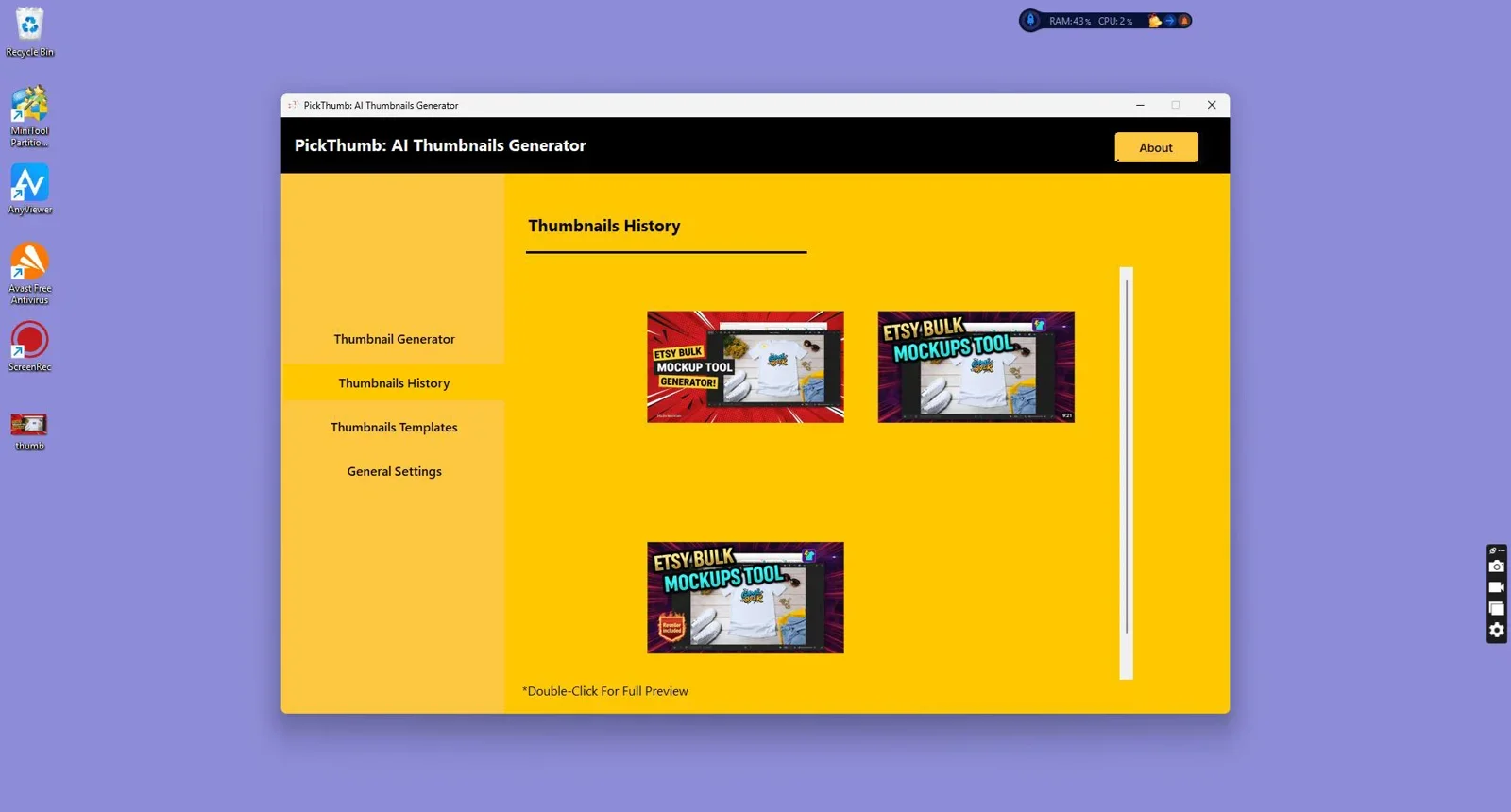
PickThumb is a dedicated AI thumbnail generator built specifically for YouTube creators and advertisers. It generates professional, viral-style thumbnails from a title and brief concept input, with no Photoshop, no templates to manually fill, and no design experience required. The output is optimized for YouTube's visual conventions: high contrast, bold composition, and the kind of emotional punch that drives clicks in a crowded feed.
What separates PickThumb from general AI image tools is its focus. Every generation decision in the tool is tuned for the thumbnail use case, not adapted from a broader image generation platform. The result is thumbnails that look like they came from a professional creative team, produced in the time it takes to write a prompt. For creators publishing multiple videos per week, the time savings compound quickly.

Create professional, viral-style YouTube thumbnails in minutes. No Photoshop, no templates, no designers needed.
2. Canva (AI Features)
Canva added AI image generation to its platform and remains a popular choice for creators comfortable with template-based design. The AI features are general-purpose rather than thumbnail-specific, and the output typically requires manual adjustment to hit the right visual conventions for YouTube. The monthly subscription cost is also a consideration for creators who only need thumbnail production rather than a full design suite.
3. Adobe Firefly / Photoshop AI
Adobe's AI tools are powerful and integrated into the industry-standard design workflow, but they assume design competency. For creators who already use Photoshop professionally, Firefly is a strong addition. For everyone else, the learning curve and subscription cost make it a poor fit for fast thumbnail production.
4. Midjourney (General AI Image Generation)
Midjourney produces visually impressive images but requires significant prompt engineering to generate thumbnail-appropriate compositions. Output is not sized or formatted for YouTube by default, text integration is unreliable, and the Discord-based interface adds friction to a workflow that should be fast. It is a creative tool, not a thumbnail production tool.
Who Should Use an AI Thumbnail Generator?
AI thumbnail generators deliver the highest value to creators and teams where thumbnail volume and consistency are ongoing requirements rather than occasional needs.
- Solo YouTubers publishing 2 to 5 videos per week who cannot justify the time or cost of a dedicated designer benefit most from a fast, purpose-built tool.
- Content agencies managing multiple YouTube channels need thumbnail production at scale. A tool that generates consistent, high-quality output without per-thumbnail cost changes the unit economics of channel management.
- Paid advertisers running YouTube pre-roll or discovery ads need compelling creative at volume. AI thumbnail generators reduce the cost and cycle time of creative iteration.
- Podcasters and educators repurposing long-form content to YouTube need thumbnails that compete with native YouTube creators without adding design overhead to an already demanding production schedule.

Stop spending 30 minutes per thumbnail. PickThumb produces click-worthy YouTube visuals in the time it takes to write a title.
Comparison Table
| Tool | YouTube-Specific | No Design Skills Needed | Generation Speed | Pricing Model | Best For |
|---|---|---|---|---|---|
| PickThumb | Yes | Yes | Under 5 min | One-time | Creators, agencies, advertisers |
| Canva AI | Partial | Mostly | 10-20 min | Monthly subscription | General design users |
| Adobe Firefly | No | No | 20-45 min | Monthly subscription | Professional designers |
| Midjourney | No | No | Variable | Monthly subscription | Creative/artistic projects |
Final Verdict
Who should use PickThumb?
Any YouTube creator publishing more than one video per week who does not have a dedicated designer on their team. PickThumb solves the thumbnail production problem specifically - not as a side feature of a broader design suite, but as its entire purpose. The one-time pricing model means the tool pays for itself after just a few videos compared to hiring freelance designers or maintaining a Canva subscription for thumbnail work alone.
Who might use something else?
Professional designers who already work in Adobe's ecosystem and have the skills to use Firefly effectively will get strong results there. Creators who publish infrequently and already have Canva for other design needs may not need a dedicated thumbnail tool.
Overall Rating: PickThumb 4.8 / 5
Frequently Asked Questions
What is the best AI thumbnail generator for YouTube in 2026?
PickThumb is the strongest dedicated AI thumbnail generator for YouTube in 2026. It is built specifically for the platform's visual requirements, requires no design skills, and produces publish-ready thumbnails in under 5 minutes. For creators who need volume and consistency, it outperforms adapted general-purpose tools like Canva AI or Midjourney.
Can AI generate YouTube thumbnails that actually get clicks?
Yes, when the tool is purpose-built for the task. Generic AI image generators often miss the composition and contrast conventions that make YouTube thumbnails perform. PickThumb is tuned specifically for viral-style YouTube output, which means the visual decisions built into the generation process are aligned with what drives CTR on the platform.
How long does it take to create a thumbnail with an AI generator?
With a dedicated tool like PickThumb, the process takes under 5 minutes from concept to a download-ready file. Compare that to 20 to 45 minutes in Canva or Photoshop for a creator without professional design skills, and the time saving per video is significant at any publishing frequency above one video per week.
Do I need a subscription to use an AI thumbnail generator?
Most AI design tools run on monthly subscriptions. PickThumb uses a one-time pricing model, which means no recurring fees and no usage caps tied to billing cycles. For creators who produce consistent volume, this is a meaningful cost advantage over subscription-based alternatives.
Can I use AI thumbnail generators for YouTube ads as well?
Yes. PickThumb is built for YouTube and ads, not just organic video thumbnails. The same visual principles that drive organic CTR apply to YouTube discovery ads and pre-roll creative, and the tool's output is sized and composed to work across both contexts.
Create Thumbnails That Actually Get Clicked
PickThumb generates professional YouTube thumbnails in minutes. No designers, no Photoshop, no monthly fees.
Get PickThumb Now →One-time payment. No subscriptions. Unlimited thumbnails.

Comments (0)
Leave a Comment