

QuickBooks Simple Start costs $30 per month. FreshBooks Lite is $19 per month. For a freelancer or small agency that only needs to create invoices, track payments, and automate recurring billing, those subscription costs are difficult to justify — particularly when the core features you actually use represent a fraction of what these platforms offer. This guide covers the best QuickBooks alternatives with no monthly fee in 2026, ranked by value, feature depth, and the type of user each tool is best suited for. If you want to stop the subscription cycle without sacrificing your invoicing workflow, one of these will be the right fit.
In this article
- Why Freelancers and Agencies Are Leaving QuickBooks
- What to Look for in a No-Subscription Alternative
- The Best QuickBooks Alternatives With No Monthly Fee
- Side-by-Side Comparison
- Which One Should You Choose?
- Frequently Asked Questions
Why Are Freelancers and Agencies Moving Away From QuickBooks?
QuickBooks is a powerful platform, but it is built for businesses that need full accounting functionality: payroll, tax preparation, bank reconciliation, and multi-user access. Most freelancers and small agencies use roughly 20 percent of those features and pay for 100 percent of the cost every single month.
The frustration compounds when you factor in price increases, feature lock-offs behind higher tiers, and the reality that your data lives on Intuit's servers with no straightforward offline access. For users whose primary need is a reliable invoice management system, the math simply does not work in QuickBooks' favor.
The good news is that 2026 has produced a strong set of alternatives, ranging from capable free tools to focused desktop apps with one-time pricing. Here is how they stack up.
What Should You Look for in a No-Subscription Invoicing Tool?
Before evaluating specific tools, it helps to define what actually matters for a solo professional or small team:
- Core invoicing features: Custom line items, taxes, discounts, and PDF export should be standard, not paid add-ons.
- Recurring billing: If you bill retainer clients monthly, automated recurring invoices save significant time.
- Payment tracking: The ability to mark invoices as paid, pending, or overdue and see outstanding totals at a glance.
- Client management: Unlimited client profiles with billing history, rather than a cap that forces you to upgrade.
- Data ownership: Knowing where your financial data is stored and whether you retain access if you ever stop using the tool.
- Offline capability: For users who travel or work in locations with inconsistent internet, a desktop-first app matters.
With those criteria in mind, here are the strongest contenders for 2026.
The Best QuickBooks Alternatives With No Monthly Fee in 2026
1. ZapyInvoice — Best Overall for Windows Users Who Want Full Offline Control
ZapyInvoice is a Windows desktop application built specifically for freelancers, consultants, and small agencies who need a complete invoice management system without a recurring subscription. It installs locally, stores all data in a SQLite database on your machine, and works entirely offline. There are no cloud accounts, no per-user fees, and no monthly charges — just a single $27 one-time payment for lifetime access.
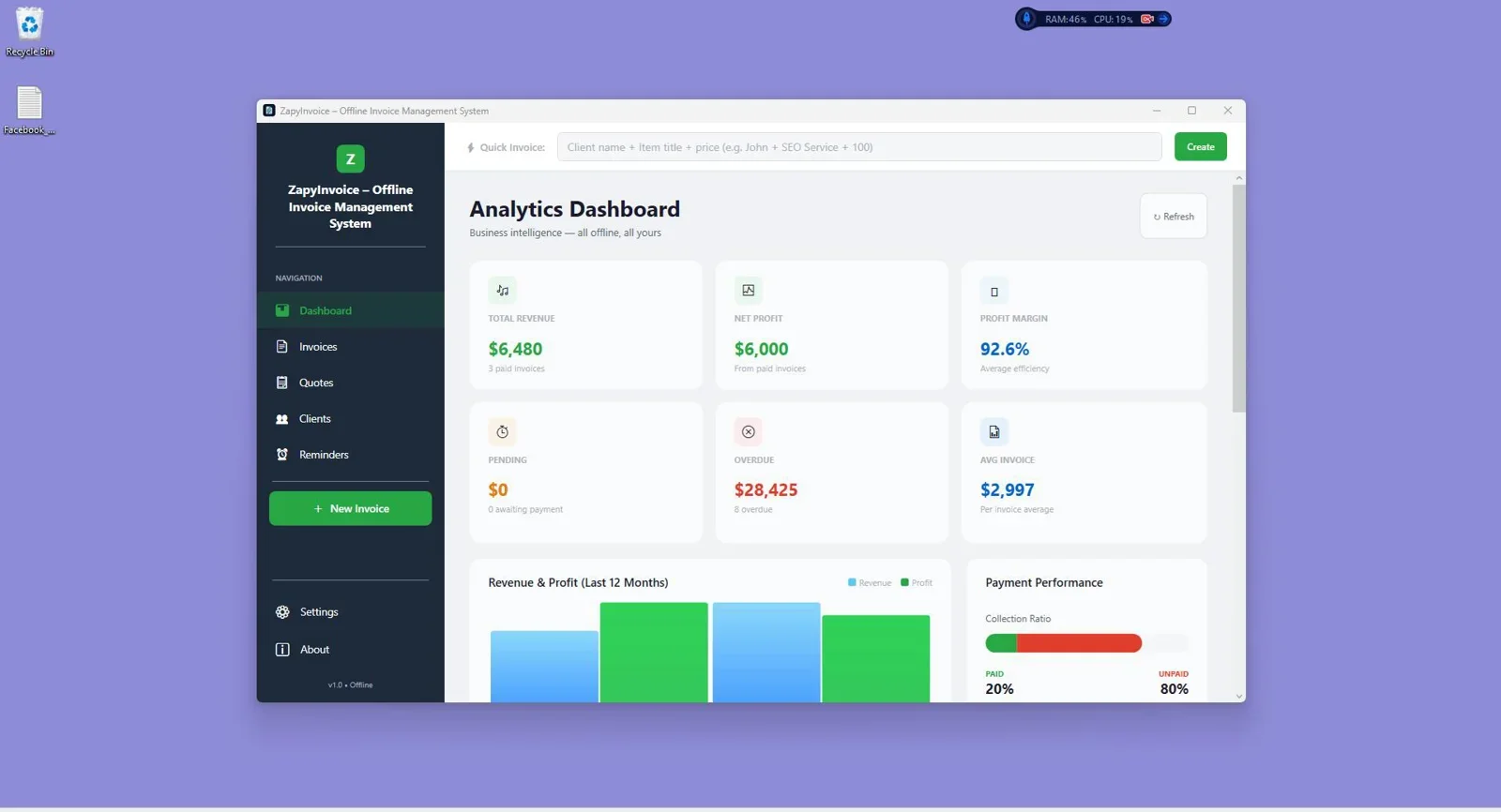
The feature set covers everything most independent professionals need: custom branded invoices with logo support, one-click PDF export, recurring billing automation, unlimited client profiles, bulk invoice operations, payment status tracking, and a built-in analytics dashboard showing revenue trends and outstanding amounts. Because the software runs locally, your financial data never leaves your machine — a meaningful advantage for anyone handling sensitive client billing information.
At $27 versus $360 per year for QuickBooks Simple Start, ZapyInvoice pays for itself in under one month. Over three years, the savings exceed $1,000 for a single user.
One-time $27 payment. Unlimited invoices, recurring billing, offline access, and full data ownership on Windows.
Best for: Windows-based freelancers, consultants, and small agencies who bill regularly and want to eliminate subscription costs permanently.
Not ideal for: Mac or mobile users, teams requiring shared access, or businesses that need integrated online payment processing.
2. Invoice Ninja (Free Self-Hosted) — Best for Tech-Savvy Users Who Want Full Control
Invoice Ninja offers a robust open-source invoicing platform that can be self-hosted on your own server, meaning no subscription and full data ownership. The feature set is extensive: recurring invoices, client portal, time tracking, expense management, and support for multiple payment gateways. The free cloud tier caps you at 20 clients, but the self-hosted version is unlimited.
The trade-off is setup complexity. Running a self-hosted Invoice Ninja instance requires a server, domain, and some technical confidence. For non-technical users, this is a significant barrier. For developers or system administrators, it is a genuinely powerful free option.
Best for: Technical users comfortable with server management who need a full-featured, free invoicing platform.
Not ideal for: Non-technical users who want a tool they can install and use immediately without configuration.
3. Wave (Free Tier) — Best for Users Who Need Basic Cloud Invoicing at No Cost
Wave remains one of the most well-known free invoicing tools, offering unlimited invoices, client management, and basic accounting features at no cost. It is cloud-based, which means it works from any browser and syncs across devices. The platform also includes income and expense tracking, which gives it a broader accounting scope than pure invoicing tools.
The limitations are worth noting. Wave has progressively moved features behind its paid tiers in recent years. Payment processing carries transaction fees, and payroll features require a separate subscription. The free tier is still functional for basic invoicing, but the platform's direction has been toward monetization of previously free features.
Best for: Users who want free cloud-based invoicing with basic accounting and are comfortable with browser-based tools.
Not ideal for: Users who need offline access, prefer no data stored in the cloud, or want a tool that will not eventually upsell core features.
4. Zoho Invoice (Free for Individuals) — Best Free Cloud Option With a Clean Interface
Zoho Invoice is permanently free for individual users, offering up to 1,000 invoices per year, client management, recurring billing, time tracking, and a client portal. It integrates with Zoho's broader business suite, which is useful if you already use Zoho CRM or Books. The interface is clean and the mobile apps for iOS and Android are well-designed.
The primary constraint is the 1,000 invoice annual cap for the free plan and the fact that your data lives within Zoho's ecosystem. If you send more than 80 to 85 invoices per month, you will hit the ceiling. Paid plans start at competitive rates, but at that point you are back in subscription territory.
Best for: Individual freelancers who need a polished free cloud invoicing tool with mobile access and existing Zoho ecosystem users.
Not ideal for: High-volume invoicers on the free tier or users who want offline access and full data portability.
5. Bonsai (Paid, but Broader Scope) — Best for Freelancers Who Want Contracts, Proposals, and Invoicing Together
Bonsai is not free, but it offers a genuinely different value proposition from QuickBooks. Rather than replacing accounting software, it replaces the entire client workflow: proposals, contracts, project management, time tracking, and invoicing in one platform. Pricing starts at around $17 per month, which is less than QuickBooks and covers substantially more of a freelancer's operational stack.
If your frustration with QuickBooks stems from paying for accounting features you do not need while still managing contracts and proposals elsewhere, Bonsai consolidates that overhead into a lower monthly cost with a more relevant feature set for service-based freelancers.
Best for: Freelancers who want one tool to manage the entire client lifecycle from proposal to payment.
Not ideal for: Users who want to eliminate monthly fees entirely or who only need invoicing functionality.
Side-by-Side Comparison
| Tool | Pricing | Offline? | Recurring Billing | Client Limit | Best For |
|---|---|---|---|---|---|
| ZapyInvoice | $27 one-time | Yes | Yes | Unlimited | Windows freelancers and agencies |
| Invoice Ninja | Free (self-hosted) | Partial | Yes | Unlimited | Technical users |
| Wave | Free (core) | No | Yes | Unlimited | Basic cloud invoicing |
| Zoho Invoice | Free (1,000 invoices/yr) | No | Yes | Unlimited | Individuals with mobile needs |
| Bonsai | From $17/month | No | Yes | Unlimited | Full freelancer workflow |
| QuickBooks | From $30/month | No | Yes | Unlimited | Full accounting needs |
Which QuickBooks Alternative Should You Choose?
The right choice depends on two questions: do you need offline access, and do you want to pay anything on a recurring basis?
If you are a Windows user and the answer to both is no, ZapyInvoice is the clearest recommendation. It covers every core invoicing need, runs entirely offline, and costs $27 once. There is nothing to cancel, no tier to upgrade, and no data held hostage in a cloud account you might lose access to.
If you need a free cloud option and are comfortable with browser-based tools, Zoho Invoice is the most polished choice for individuals, and Wave remains a solid fallback for users who also want basic accounting features bundled in. For technical users willing to manage their own server, Invoice Ninja (self-hosted) is the most powerful free option available.
If you need contracts, proposals, and client management alongside invoicing, Bonsai offers better value than QuickBooks for service-based freelancers even though it carries a monthly fee.
Replace your invoicing subscription with a single $27 payment. Offline, unlimited, and built for Windows professionals.
Frequently Asked Questions
Is there a free alternative to QuickBooks for freelancers?
Yes. Wave and Zoho Invoice both offer free tiers that cover core invoicing needs for individual users. Wave includes basic accounting features, while Zoho Invoice is capped at 1,000 invoices per year on its free plan. For Windows users who prefer a one-time payment over a recurring subscription, ZapyInvoice at $27 is a strong alternative that includes offline access and unlimited invoices.
Can I switch from QuickBooks to another invoicing tool without losing my data?
Most QuickBooks alternatives support CSV import for clients and invoice history. Before switching, export your client list and invoice records from QuickBooks in CSV format. Tools like ZapyInvoice, Wave, and Zoho Invoice can import this data to preserve your existing records. It is worth checking the specific import options of whichever tool you choose before committing.
What is the best invoicing software with no monthly fee?
For Windows users, ZapyInvoice is the strongest option: a one-time $27 payment, fully offline, unlimited clients and invoices, recurring billing, and no cloud dependency. For users who need a browser-based free tool, Zoho Invoice (free for individuals) or the self-hosted version of Invoice Ninja are both solid choices depending on your technical comfort level.
Does ZapyInvoice work without an internet connection?
Yes. ZapyInvoice is a fully offline Windows desktop application. It stores all data locally using a SQLite database and does not require an internet connection to create invoices, track payments, or run recurring billing. This makes it particularly useful for consultants and contractors who work in locations with unreliable connectivity.
Is Wave invoicing really free?
Wave's core invoicing and accounting features remain free, but the platform has progressively moved some functionality to paid tiers. Payment processing carries transaction fees (starting at 2.9 percent plus $0.60 per transaction), and payroll requires a separate subscription. For straightforward invoice creation and client management, the free tier is still functional as of 2026.
What should I look for in a QuickBooks alternative for a small agency?
For a small agency, the key features to prioritize are unlimited client profiles, recurring billing automation, team access (if more than one person sends invoices), PDF export with custom branding, and clear payment tracking. If your team is small and Windows-based, ZapyInvoice covers all of these except multi-user access at a fraction of the cost of QuickBooks. If team collaboration is essential, Wave or Zoho Invoice offer multi-user options on their paid plans.
Done Paying Monthly for Invoicing Software?
ZapyInvoice is a one-time $27 Windows app with unlimited invoices, recurring billing, offline access, and full data ownership. No subscription. No renewal. No cloud.
Get ZapyInvoice Now →One-time payment. Lifetime access. Windows desktop app.




Comments (0)
Leave a Comment