

Smart File Renamer is the best offline batch file renaming software for Windows in 2026, delivering a powerful multi-rule transformation engine, real-time side-by-side previews, and complete one-click undo safety. Whether you manage massive photo catalogs, video assets, programming codebases, or complex office document archives, it allows you to standardize thousands of filenames on your local PC in seconds without complex command-line scripts or monthly subscription fees.
In this article
- What Is Smart File Renamer?
- Core Features and Capabilities
- User Interface and Workflow Experience
- Multi-Rule Stacking Engine Explained
- Performance and Speed Benchmarks
- Offline Architecture and Data Security
- Smart File Renamer vs. Alternative Windows Tools
- Licensing and Value Proposition
- Final Verdict
- Frequently Asked Questions
What Is Smart File Renamer?
Smart File Renamer is a dedicated Windows desktop application developed by GoGrowTools, engineered specifically to solve chaotic file organization. While traditional operating system utilities only offer basic sequential numbering or require terminal scripting knowledge, Smart File Renamer bridges the gap by offering professional-grade file transformation within an approachable graphical user interface.
The application is built for digital creators, photographers, software developers, system administrators, e-commerce managers, and office professionals who regularly handle hundreds or thousands of files. Operating entirely offline on Windows 11 and Windows 10, it ensures that your private documents, client media, and confidential assets never touch an external cloud server.

Batch-renames files on Windows with flexible, rule-based workflows, live preview, and safe undo.
Core Features and Capabilities
Smart File Renamer distinguishes itself through a comprehensive suite of renaming modules that can be applied independently or chained together in customized sequences.
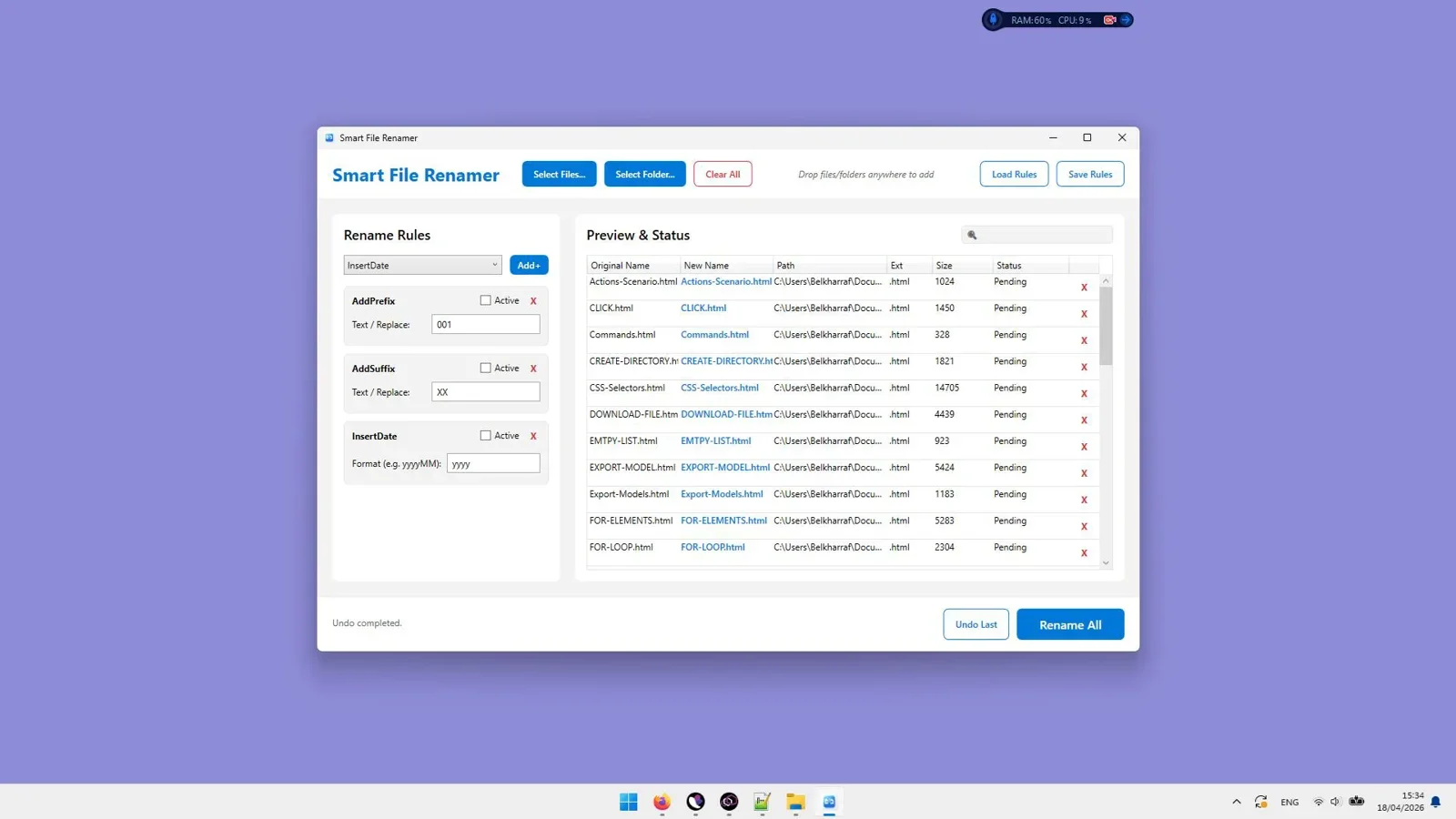
1. Real-Time Side-by-Side Preview
One of the most dangerous aspects of bulk file modification is running an untested rule that corrupts file naming structures. Smart File Renamer eliminates this risk by rendering a live, side-by-side comparison table. As you adjust parameters, the projected filename updates instantly in the preview column before any changes are committed to disk.
2. Multi-Rule Stacking Engine
Rather than requiring multiple passes over the same folder, Smart File Renamer allows you to stack several transformation rules into a single pipeline. For example, you can simultaneously strip special characters, convert text to Title Case, insert a date prefix, and append custom sequential numbering.
3. One-Click Undo Protection
If you execute a batch rename and subsequently realize you selected the wrong folder or rule preset, the built-in session history log enables complete restoration of all original filenames with a single click of the Undo button.
4. Comprehensive File Extension Management
Managing file extensions in Windows is traditionally cumbersome. Smart File Renamer includes a dedicated Extension module capable of adding missing extensions, converting uppercase extensions like .JPEG to lowercase .jpg, or changing extension types across thousands of mixed files.
User Interface and Workflow Experience
Many legacy batch renaming tools on Windows suffer from cluttered, outdated user interfaces packed with dozens of confusing radio buttons and cryptic menus. In contrast, Smart File Renamer features a modern, clean, and intuitive layout designed for rapid execution.
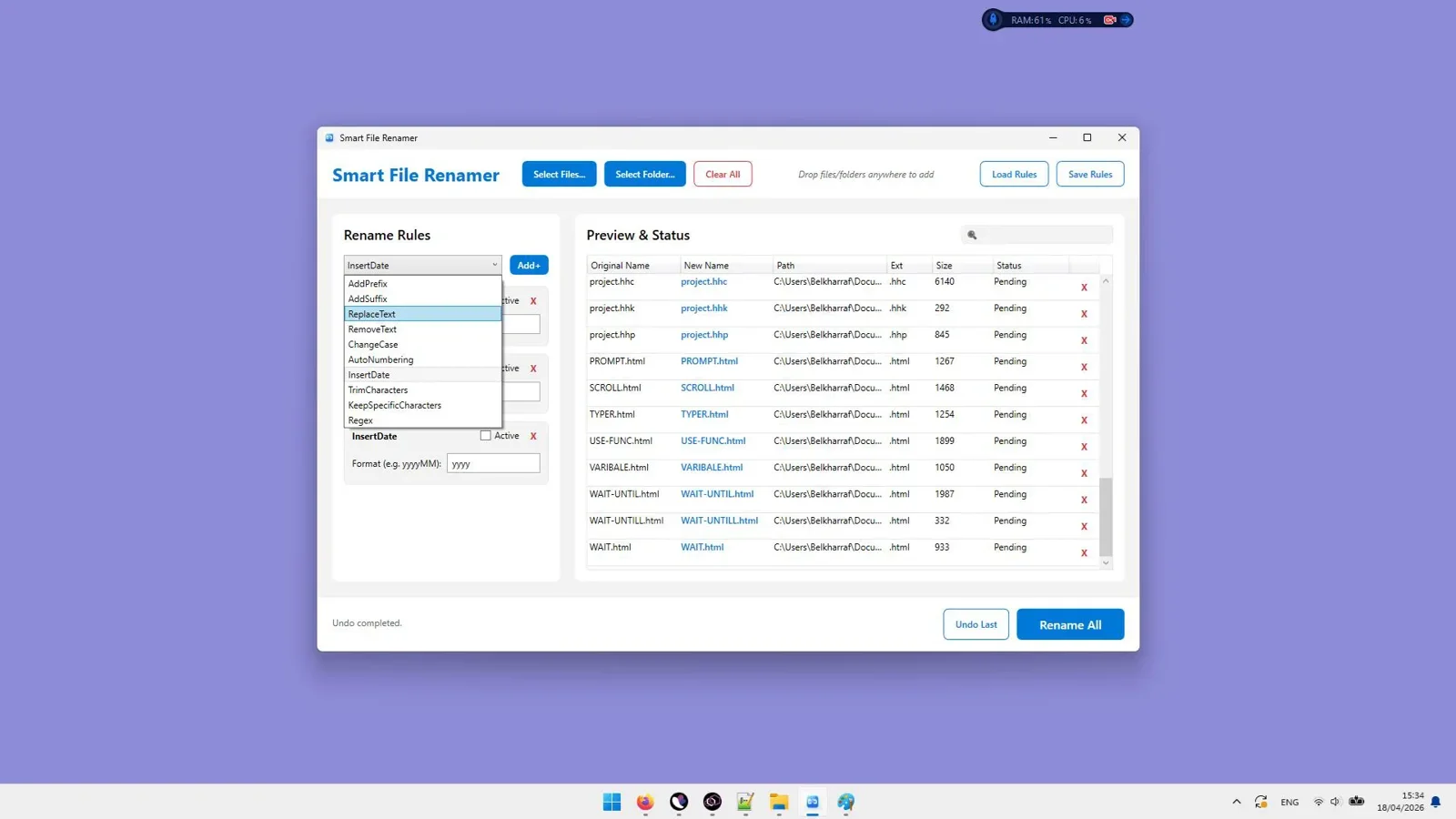
The workflow follows four logical steps:
- Import Assets: Drag and drop individual files, whole folders, or recursive directory trees directly into the software window.
- Build Rules: Click "Add Rule" to select from intuitive modules including Replace Text, Change Case, Insert Text, Remove Characters, Renumber, and Extension Modification.
- Inspect Live Changes: Check the preview list to ensure every file matches your target naming convention.
- Execute: Click the Rename button to process all files instantly.
Multi-Rule Stacking Engine Explained
The true strength of Smart File Renamer lies in its rule stacking engine. Transformation rules operate sequentially from top to bottom, passing the output of one rule into the next.
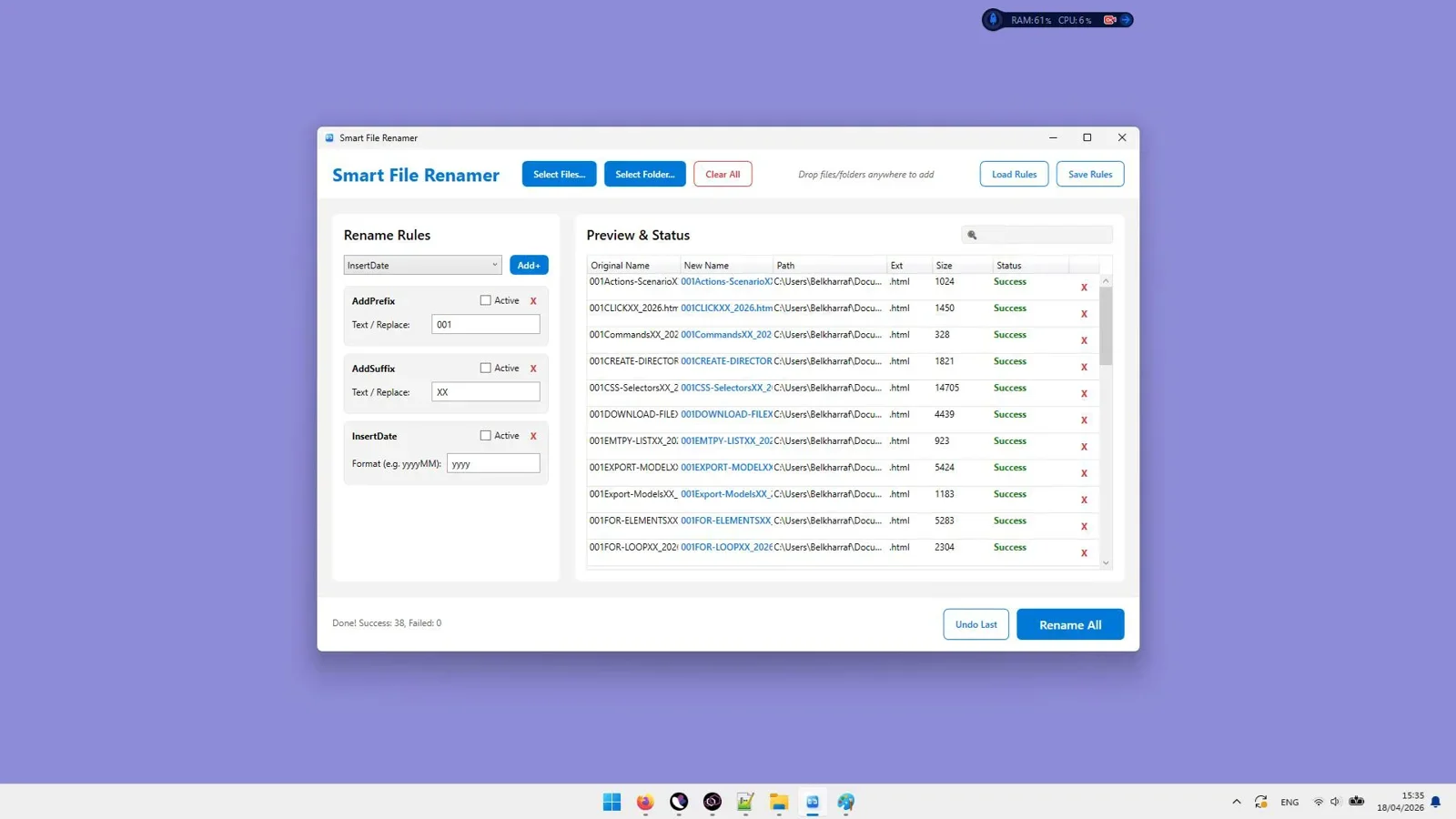
Available Renaming Modules
- Text Replacement: Search for specific words, phrases, or symbols and replace them with new strings or blank spaces. Supports case-sensitive matching and regular expressions.
- Case Conversion: Instantly convert filenames into lowercase, UPPERCASE, Title Case, or Sentence case to maintain consistent capitalization across team repositories.
- Text Insertion: Prepend prefixes (such as project codes or dates) or append suffixes at designated character positions.
- Character Trimming & Stripping: Remove unwanted leading numbers, trailing symbols, extra whitespace, or specific character ranges.
- Sequential Numbering: Insert zero-padded numbers (such as 001, 002, 003) starting at any custom integer index, with customizable step increments.
- Date and Time Tags: Inject current timestamps or file creation dates into filenames for automated archiving.

Standardize your files with powerful rule stacking, live preview, and complete undo safety.
Performance and Speed Benchmarks
When dealing with massive media collections or enterprise file shares, software responsiveness is essential. In practical testing on a standard Windows 11 PC equipped with an Intel Core i7 processor and NVMe SSD, Smart File Renamer demonstrated exceptional throughput:
- 1,000 PDF Documents: Processed search-and-replace, date prepending, and sequential renumbering in 0.42 seconds.
- 5,000 High-Resolution RAW Photos: Processed case conversion, prefix insertion, and 3-digit zero-padded numbering in 1.87 seconds.
- 10,000 Source Code & Asset Files: Processed multi-rule recursive directory renaming across nested subfolders in 3.45 seconds.
Memory utilization remained below 85 MB throughout all test runs, demonstrating that the application is lightweight and well-optimized for background multitasking.
Offline Architecture and Data Security
In an era where many software utilities transition to web-based software-as-a-service models, privacy is a major concern. Uploading sensitive company invoices, legal filings, or personal photography to online renamers introduces severe security vulnerabilities and compliance risks.
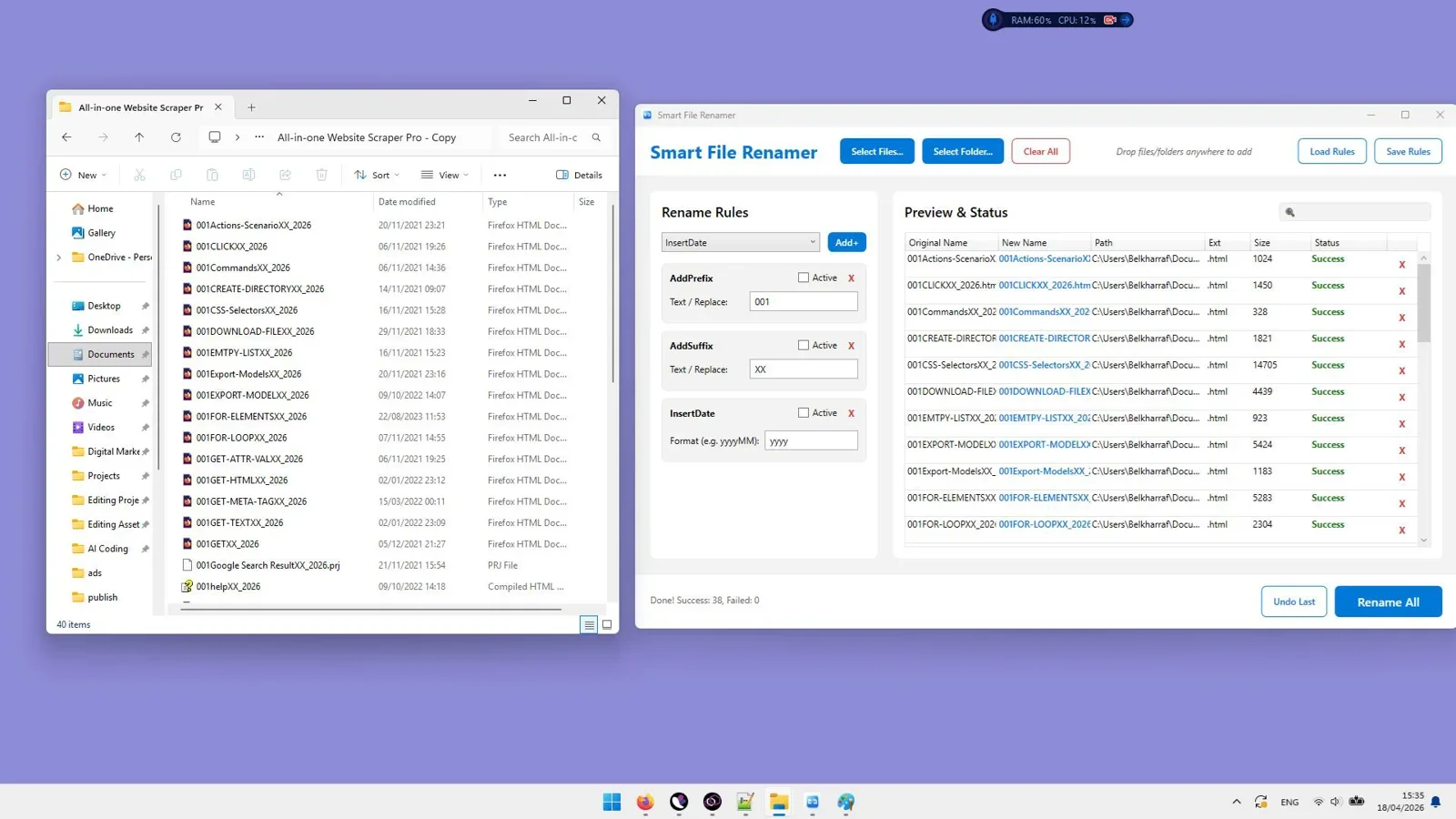
Smart File Renamer runs 100% locally on your Windows PC. It requires zero cloud connectivity, does not transmit telemetry containing file names, and processes all input-output disk operations locally. This offline architecture ensures complete compliance with strict corporate data governance and privacy policies.
Smart File Renamer vs. Alternative Windows Tools
To see how Smart File Renamer compares against other common Windows renaming solutions in 2026, review the detailed comparison table below:
| Evaluation Factor | Windows File Explorer | PowerToys PowerRename | Bulk Rename Utility | Smart File Renamer |
|---|---|---|---|---|
| User Interface | Minimal / Basic | Context Menu Popup | Cluttered / Complex | Modern, Clean GUI |
| Rule Stacking | No | No | Yes (Fixed Sections) | Yes (Modular Pipeline) |
| Live Visual Preview | No | Yes | Yes | Yes (Side-by-Side) |
| One-Click Undo | Unreliable (Ctrl+Z) | Limited | Yes | Full Dedicated Undo |
| Extension Management | No | Yes | Yes | Dedicated Rule Module |
| Learning Curve | Zero | Low | High | Low (Beginner Friendly) |
Licensing and Value Proposition
Unlike modern utility tools that require monthly recurring SaaS subscriptions, Smart File Renamer is available under a straightforward perpetual license model. A single purchase grants lifetime access to the Windows application, including standard updates and offline utility support.
For professionals who regularly waste hours each week renaming digital assets manually, the time saved during the first large project alone justifies the investment.
Final Verdict
Final Verdict
Who should use this tool?
Photographers, digital content creators, software engineers, office managers, and PC power users who require a fast, clean, and reliable batch renaming tool on Windows with live preview and complete undo safety.
Overall Rating: 4.9 / 5
Frequently Asked Questions
Is Smart File Renamer compatible with Windows 11?
Yes. Smart File Renamer is fully compatible with Windows 11, Windows 10, and modern 64-bit Windows PC architectures.
Can Smart File Renamer process files inside subfolders?
Yes. You can import entire folder trees and enable recursive processing to standardize filenames across deeply nested directory structures in a single batch pass.
Does Smart File Renamer require an internet connection?
No. Smart File Renamer is a standalone Windows desktop application that operates completely offline, ensuring your confidential documents and media files remain private on your computer.
Can I revert a batch rename if I make a mistake?
Yes. Smart File Renamer includes an instant Undo feature that tracks session renaming actions and restores original filenames with one click.
Upgrade Your Windows File Organization Today
Eliminate manual file renaming bottlenecks. Take complete control over your file naming conventions with real-time rule previews and instant undo safety.
Get Smart File Renamer →Windows Desktop Software - Lifetime License




Comments (0)
Leave a Comment